.svg)



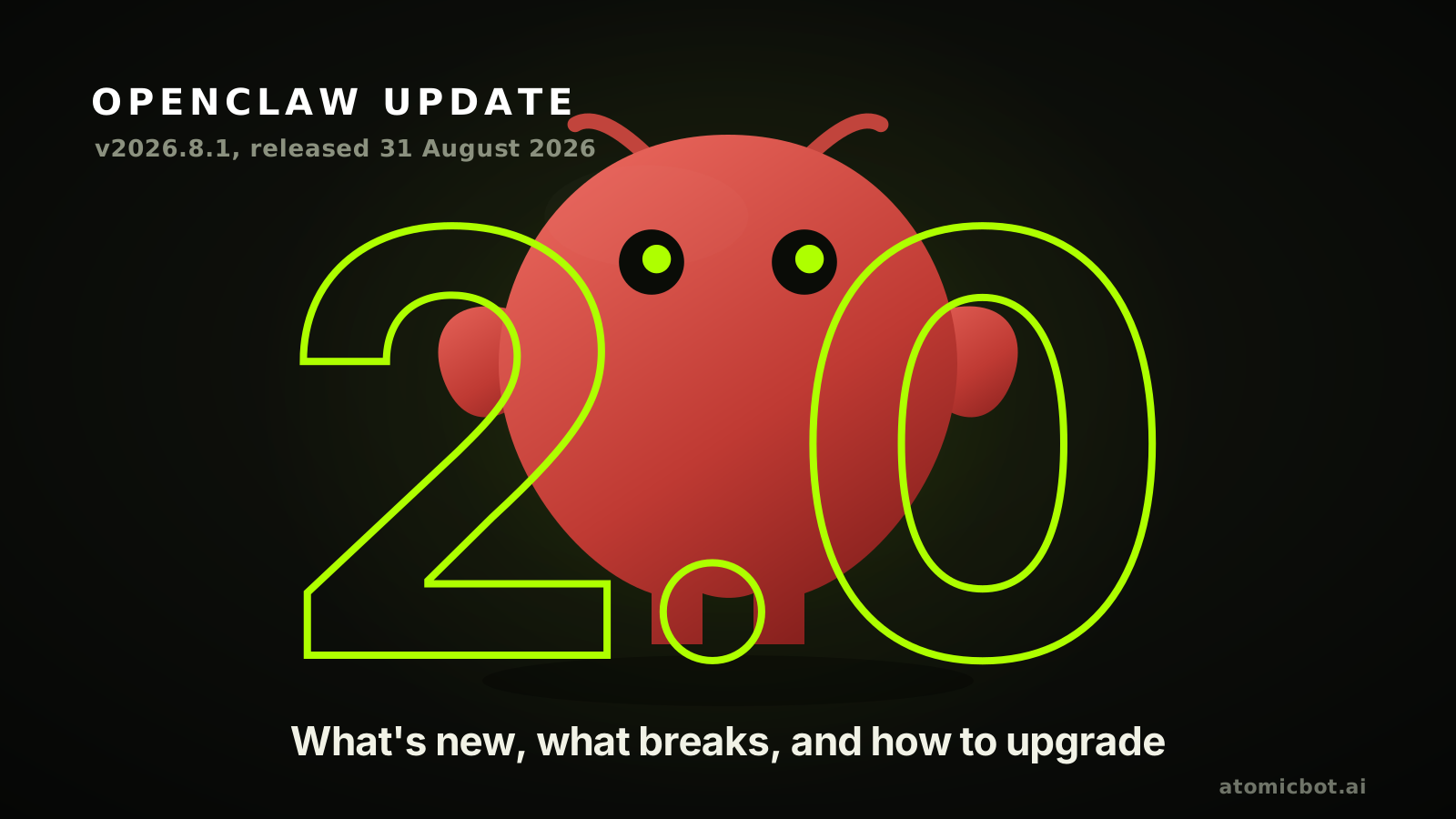
OpenClaw 2.0 launched on 31 August 2026 as v2026.8.1, and it is the largest update the project has published. The release notes count 16,977 pull requests, 698 direct commits and 987 contributors. The team's own write-up says those pull requests are roughly half of everything OpenClaw has ever merged. The 106 releases before it came out over 230 days, most of them a day or two apart, so a gap of almost seven weeks was unusual for this project.
This page covers what changed and what happens to your sessions. 2.0 moves them into a new store, and the release warning about it is easy to miss. If you would rather not run any of it, Atomic Bot keeps OpenClaw current for you.
🎯 Quick answer
OpenClaw 2.0 is the name for release v2026.8.1, not a separate product. OpenClaw itself is open source, MIT licensed and free to run: an agent that connects a model to your files, tools, memory and messaging channels. This release is a full pass over the project, from conversation search to credentials and approvals.
What changed. Conversation search finds an exact phrase and reopens the messages around it. Conversations have branches you can rewind or fork. Sessions run on paired devices and cloud workers, not only on the Gateway. Skill Workshop keeps what the agent taught itself in one reviewable place.
What breaks. The bundled OpenProse plugin and the /prose command are gone, and codex/* and openai-codex/* model references move to openai/*. Both are migrations openclaw doctor --fix performs, and it flags what it cannot resolve instead of guessing.
Your sessions. Sessions and transcripts leave their JSON and JSONL files for SQLite. openclaw update runs that migration during activation. If you roll back later, anything created after the migration will not be there, so back up before you start.
Skip the upgrade. Atomic Bot runs OpenClaw in the cloud: choose your agent and it is live in about a minute, with 100+ models to switch between and the newest ones there as they ship. OpenClaw updates and maintenance are on us.
OpenClaw 2.0 changelog and release notes
The OpenClaw changelog runs to hundreds of entries. This table covers the parts most people will notice, and what each one asks of you after the update.
What's new in OpenClaw 2.0
The release reached installation, messaging, memory, skills, models, automations, the Control UI, native apps, plugins and security. The sections below follow the areas where the change shows up in daily use.
Three defaults changed, and they are worth knowing before you read further:
- Automatic self-learning is on out of the box.
- Background memory consolidation runs by default.
- Personal conversation recall waits until you enable Active Memory.
Everything here comes from the v2026.8.1 release notes.
OpenClaw skills in 2.0
Skill Workshop puts what your agent learned in one place you can review. It consolidates learned skill collections through a review flow you can recover from, reuses existing skills during /learn, and schedules the review as a Gateway-owned automation.
Self-learning is the default now, so check your policy before it starts applying things. OpenClaw captures reusable lessons and applies scanner-approved new or Workshop-owned skills on its own, while changes to skills you wrote stay pending. Workshop actions run without a prompt too, apply, reject and quarantine alike. skills.workshop.approvalPolicy: "pending" puts the gate back.
External skills changed route. A skills-sh: reference installs through ClawHub's mirrored, commit-pinned artifacts and the usual safety checks instead of downloading from the source registry. If you are still choosing what to run, we keep a list of the best OpenClaw skills.
The rebuilt OpenClaw Control UI
Conversation search is the change people notice first. You search visible conversation text by exact words or phrases, then reopen the messages around a match.
Conversations now have branches. Rewind or fork from a message of your own, then switch between the paths that were kept. Rewinding changes the chat context, it does not undo files or other tool effects.
Widgets run inside chat. Pin one to a session dashboard, grant it exact actions or network origins, and export the rendered view as an image.
You can now watch a long job run. Each session carries one durable progress card across web, macOS, iOS, Android and the dashboard, holding the latest plan or status through reloads, with subagent activity and accumulating edits visible while the work runs.
OpenClaw memory in 2.0
Two memory settings changed, and they behave differently. Grounded dreaming is on out of the box: it consolidates memory in the background using a model, and writes a Dream Diary you can read. Personal conversation recall waits for you to enable Active Memory. Once you do, an agent retrieves bounded context from that agent's own private conversations, while groups and channels stay excluded.
Memory became inspectable. You can see which sessions contributed to it, exclude a source from admission, and remove identifiable derived memory with openclaw memory forget, which leaves the source transcripts intact.
Onboarding also offers to import memory it detects from Claude Code, Codex and Hermes.
OpenClaw plugins
You see what a plugin is before it runs. Capabilities, source, version and the exact artifact are shown before install or enablement, and declining an update leaves the plugin you already have untouched.
Installing from an arbitrary executable source now requires --force. ClawHub, bundled, official-catalog and tracked-update sources skip that provenance warning, though capability consent still applies.
MCP servers can be added straight from composer connectors, and a shared MCP server supports per-requester OAuth credentials.
OpenClaw models and API keys
New models arrived through provider-owned discovery: Qwen 3.8 Max and Flash, DeepSeek V4 Flash Vision (experimental), NVIDIA Nemotron 3.5 Lightning, and GLM-5.3 and Flash.
Nine provider packages now install through onboarding instead of shipping in the box: BytePlus, ComfyUI, Mistral, NovitaAI, OpenCode, Synthetic, Volcengine, Vydra and Xiaomi. Cohere, Meta, Voyage embeddings and DuckDuckGo search ship the same way, and OpenCode Go stays bundled.
Model access moved behind an allowlist. modelPolicy.allow is kept separate from aliases and per-model settings, takes per-agent policies and provider wildcards, and doctor migrates a valid legacy restriction without silently opening access when the migration is incomplete.
Switching a model now asks about scope: this session, this agent, or the shared default. Provider accounts have an order too, so an account in quota cooldown hands the request to the next authorized account for the same provider.
Context budgets are explicit now. Normal GPT-5.5 and GPT-5.6 runs get a 272,000-token budget by default, and the 922,000-token input window is the part you opt into. For supported Claude 5 CLI conversations the Control UI picks between 200K and 1M.
Keys are set per instance on Atomic Bot, so one agent can use a provider subscription while another uses a pay-as-you-go key.
OpenClaw on Telegram, Slack and Discord
The whole Control UI now opens inside Telegram. Send /dashboard in a bot DM and it opens as a Telegram Mini App. Messages can optionally carry native tables, headings, checklists and formulas through Bot API 10.2, with ordinary HTML kept as the compatibility default.
Slack support now covers what large workspaces ask about: Enterprise Grid identity, workspace routing, actions, approvals and presence. A DM or group DM opens with 1 to 8 recipients, and opening one sends nothing and grants no history access.
Discord gained widgets and voice rooms. Agent-generated HTML widgets open inside Discord Activities once you configure the bot application and its public Gateway route, and wake-name gating adapts to room size, so one person can speak naturally while a shared room requires the agent's name.
Channels became triggers rather than only output. An agent can wake when an eligible Discord participant comes online, or when a Slack participant who was active earlier comes back, with scoped audiences and cooldowns. A new plugin starts agent work from configured inbound IMAP mailboxes, and ambient heartbeat alerts now go to the owner's DM instead of whatever group spoke last.
All of this needs a Gateway that is running, or the wake-up never happens. Atomic Bot instances run around the clock, so a scheduled job fires on time.
OpenClaw 2.0 security changes
Credentials stop passing through the chat. An agent asks for one through a masked request, and the value goes into an approved Gateway-hosted HTTPS request without appearing in plaintext configuration or model-visible text. The new team-scoped Secret Store keeps Protected values apart from agent-readable environment values, and it can resolve Vault or 1Password references instead of holding the secret itself.
One limit to know before you move keys into that store: Secret Store values "are not encrypted at rest and depend on the filesystem permissions of OpenClaw's state directory".
Permissions became per-session. A session runs as read-only, guarded, workspace or full access, with full access kept for administrators, and per-turn exec restrictions can tighten that policy but never loosen it. These controls are nonretroactive, so sessions that existed before the update keep the previous global posture until you set a mode.
Approvals now attach to an exact operation. A recurring automation is approved once for a specific command and working directory, a changed job asks again, and the approvals page lists standing grants with their owning automation and use count. Revoke one and the next occurrence asks, because revocation lands at the next spawn boundary rather than mid-run.
Incognito threads live in process memory and vanish on restart, but the model provider still sees the messages and tools can still write files. Our guide to OpenClaw security best practices covers what to set beyond the defaults.
Team roles and per-session modes are collaboration controls for people who already trust each other, and the release notes call them "not hostile-tenant isolation". Teams that must not see each other belong on separate Gateways, not a shared one.
OpenClaw 2.0 breaking changes
Two entries carry the breaking label, and they need different things from you.
OpenProse. The bundled OpenProse plugin and the /prose command are removed. Run doctor to clear the stale configuration, then follow the upstream Agent Skill migration. Your existing .prose source files stay where they are.
OpenAI routes. Shipped codex/* and openai-codex/* model references move to openai/*, and so do provider config, stored sessions and automation routes. Doctor performs the move, keeps Codex runtime intent, and flags conflicts for you to repair rather than resolving them quietly.
Agent naming changed too, without the label. Legacy main-session history migrates to a clear owner, and main becomes an ordinary agent ID once the required doctor repairs are done.
Plugin authors have their own deadline. The release put the old SDK subpath imports behind a removal gate with a recorded target of 1 September 2026, and the 2026.8.2 notes say those paths remain available in that release. Config runtime moves to api.pluginConfig, the channel subpaths move to channel-outbound and channel-inbound, and the Plugin SDK migration guide carries the mapping for every helper.
Before any of it, back up your configuration and state.
How to update OpenClaw to the latest version without losing your sessions
Your conversation history moves to a new place in this release. Sessions and transcripts used to be files: a sessions.json index next to one JSONL file per transcript. In 2.0 they are rows in SQLite, by default at ~/.openclaw/agents/<agentId>/agent/openclaw-agent.sqlite. The release notes say it in the first line of the page: "This release changes how sessions and transcripts are stored by moving them into SQLite."
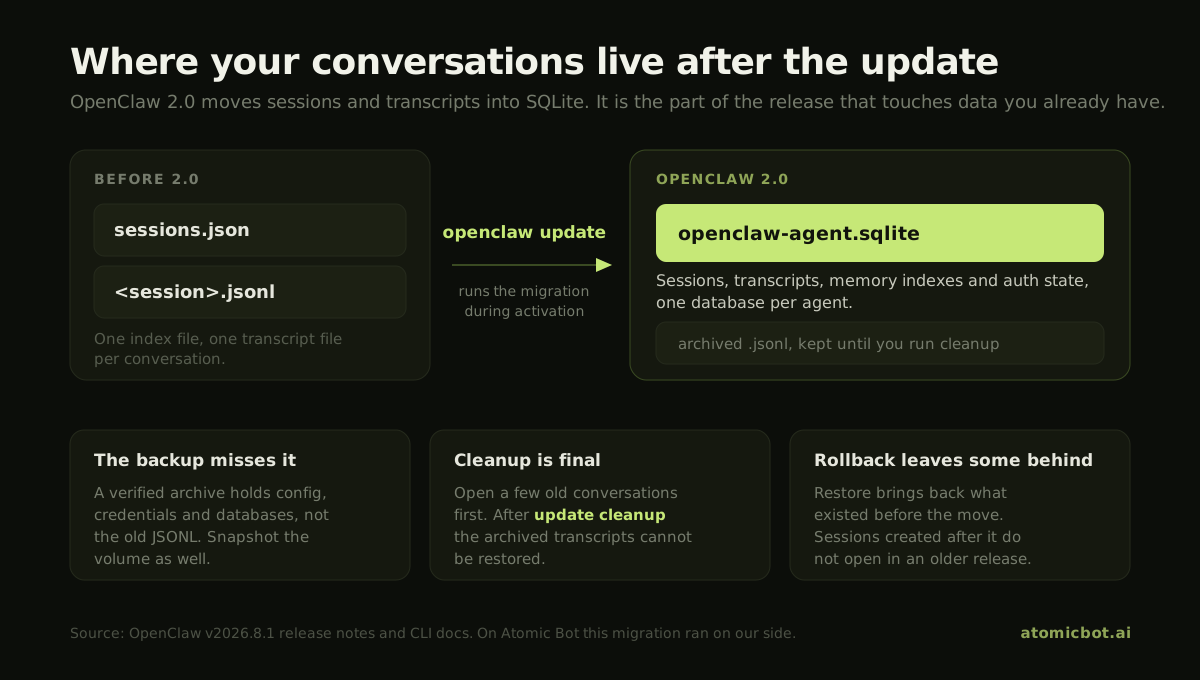
Leave disk headroom before you start. The migration needs room for the original files, a temporary SQLite spool, and the destination database with its WAL at the same time, and SQLite can end up larger than the JSONL it replaced. Check free space on both the state volume and the system temporary volume.
Nothing reads the old files after that. Doctor "is the only owner for persistent file-to-SQLite migrations", and the docs are explicit that "runtime code does not perform lazy imports or fallback reads". So the history is either migrated or it is not there.
openclaw update runs the migration for you during activation. If you install the package by hand, the Gateway checks for a legacy session store on startup, "refuses readiness and prints a doctor --fix command for the active profile instead of serving empty history". The Gateway stops with an error instead of starting with an empty history.
Your old transcripts are archived rather than deleted, and openclaw update cleanup is what finally retires them. Run it once you have opened a few old conversations and seen them intact. After cleanup, "restore reports intentional disposal and cannot recreate them".
The backup command the release notes recommend does not save those legacy transcripts: "the portable archive omits matching JSONL transcripts and logs even when they are no longer being written". A verified archive protects your configuration, credentials and databases, not the JSONL history of a pre-2.0 install. For that, stop the Gateway and take a filesystem, volume or VM snapshot before you update.
You lose sessions when you go back, not when you go forward. With writers stopped, openclaw doctor --session-sqlite restore --session-sqlite-all-agents puts the archived transcripts back where they were, and an older release can read them again. Sessions you created after the migration exist only in SQLite, so they "will not appear in older releases". Two more items are not migrated at all: pending pairing requests and bootstrap codes.
Instances on Atomic Bot came up on 2.0 with their history in place, because the migration ran on our side. Nobody had to read a storage warning to keep their conversations.
Stopping the Gateway comes first, then one command, with a backup before it and a check after it. The update guide carries the full procedure.
openclaw gateway stop
mkdir -p ~/Backups/openclaw
openclaw backup create --output ~/Backups/openclaw --verify
--verify does real work. It checks the archive against its manifest, rejects unsafe paths and symlinks, and runs integrity and role checks on every OpenClaw database inside. On a pre-2.0 install, add a filesystem or volume snapshot for the JSONL transcripts the archive leaves out.
Then update. The updater detects your install type (npm, pnpm, Bun or git), validates the candidate while the old Gateway keeps serving, runs the required Doctor migrations, then activates and verifies the result.
openclaw update
openclaw update --dry-run previews the whole plan without writing config, installing or restarting. --channel beta, --channel extended-stable and --channel dev switch release channels, and stable is the default. --tag overrides the package target for one run and leaves your saved channel alone.
Installing the package by hand instead:
npm i -g openclaw@latest --allow-scripts=openclaw
pnpm add -g --allow-build=openclaw openclaw@latest
bun add -g --trust openclaw@latest
That path skips the recovery workflow, so run the migrations yourself and restart:
openclaw doctor --fix
openclaw gateway restart
openclaw health
Check the history before you clean anything up. openclaw doctor --session-sqlite inspect --session-sqlite-all-agents --json reports what the session migration did, and it is read-only, so it needs no downtime. Once your conversations look right, openclaw update cleanup --dry-run shows which originals cleanup would retire.
If a configured provider package went missing during the update, openclaw update repair puts it back. Installing from scratch is a different path, covered separately for macOS and Linux and for Windows.
To go back a version, preview it first, then repeat without the dry run. The updater checks compatibility and asks you to confirm a downgrade.
openclaw update --tag <known-good-version> --dry-run
Downgrading the package does not downgrade your data. Config and database migrations stay where they are, and once state has moved past what the older release understands, the supported route is restoring a pre-update backup with its matching version.
OpenClaw system requirements after the update
The 2.0 notes do not raise the hardware floor. The changes are in the package managers: npm 12 and npm 11.16 or newer need --allow-scripts=openclaw, pnpm needs --allow-build, Bun needs --trust. On npm 11.15 and earlier, drop the flag.
Disk space is the requirement that changed in practice, and the section above explains how much the session migration needs while it runs.
Cloud worker bootstrap images need a supported Node.js, npm and registry access, and a reverse proxy in front of them has to forward the authenticated bootstrap-artifact route. The hardware numbers are in our OpenClaw system requirements guide.
What running OpenClaw 2.0 costs
OpenClaw is open source and free to download. The agent around it is not free to run, and four lines make up the bill.
Two 2.0 defaults call a model when nobody is typing. Grounded dreaming runs memory consolidation in the background, and self-learning reviews finished work to propose skills, with every learning decision coming from a model reading real evidence. Both have an off switch, and both are worth finding on day one if you pay per token.
The Gateway line does not follow how much you use it. A digest that fires at 7am needs a machine that is awake at 7am, so a rented server bills for the month whether the agent worked ten minutes or ten hours.
Atomic Bot prices that line at $19 a month for Base (4 vCPU, 8 GB RAM, 80 GB SSD, $5 in credits), $39 for Pro and $79 for Max. Model spend stays with your provider, on your own keys.
OpenClaw not working after the update
Start with openclaw doctor. Safe configuration migrations also run at Gateway startup before normal operation, so a restart on its own clears part of the list.
If the update fails partway, openclaw triage opens the first coding agent it can launch and hands it the installation, so the agent reads the migration errors and confirms that the Gateway starts.
Conflicts that doctor cannot resolve are flagged rather than fixed quietly, so read its output line by line.
How to skip the upgrade
None of the above has to be your job. Atomic Bot runs OpenClaw in the cloud and moves the version on our side. You open your agent, it is already on the new version, and the channels and automations you set up still point where they pointed.
What you give up is the shell. A managed agent has no root login and no SSH, and the environment belongs to the platform. If you want the machine itself, keep the sections above, and our OpenClaw hosting guide compares managed hosting against renting a VPS on the things that usually decide it: price, control and who gets paged when the Gateway stops.
FAQ
Get started with OpenClaw 2.0 in the cloud
The update is worth taking, and it is worth taking a snapshot first. If you are upgrading, the order is: stop the Gateway, back up with --verify, run openclaw update, then check your conversations before openclaw update cleanup retires the originals. Read the two breaking entries first, and read doctor's output for flagged conflicts.
If you would rather not maintain the machine, Atomic Bot runs OpenClaw in the cloud on plans from $19 a month and moves the version for you. Sign in and there is nothing to update.
Either way, read the release notes before you start.