.svg)



DeepSeek Harness (dsh) is an open-source agent harness: the runtime layer that connects an AI model to files, terminals, tools, sessions and subagents. DeepSeek AI published it on August 13, 2026 under the MIT licence. In five days it collected 155,466 GitHub stars.
What makes this one worth reading is where the plugin boundary sits. In most harnesses you extend an agent that already exists. Here every capability is a plugin, the agent loop included, so the layers come apart and can be examined one at a time. The architecture documentation states the goal directly: "There is no privileged core to patch."
Figures come from the GitHub and npm APIs on August 18, 2026. This project is five days old and the numbers move hourly.
🎯 What is DeepSeek Harness? Quick answer
DeepSeek Harness is an agent harness in which every capability is a plugin, the agent loop included. DeepSeek AI released it under the MIT licence on August 13, 2026. It supplies the runtime: tools, filesystem, shell, session log, subagents and permissions. You supply the model.
One command starts it. npx @deepseek-ai/dsh web, then open http://127.0.0.1:3080. It needs Node ^22.19.0 || >=24.0.0. It is a developer preview, and the README says compatibility-breaking changes will happen.
How popular is DeepSeek Harness?
The comparison is what makes the number legible: in five daysdsh reached roughly 40% of the stars OpenClaw accumulated in nine months, and the plugin ecosystem moved at the same rate. The GitHub topic search API returns 7,034 repositories carrying the dsh-plugin topic.
Should you use DeepSeek Harness yet?
Take it now if you are building an agent product and the composition layer is your problem. Replacing the agent loop through configuration is what dsh is built for.
Take it now if you want to evaluate it against other agent harnesses. It installs in one command and delegates to Claude Code and Codex through its own subagent providers, so a comparison costs an afternoon — or less on Atomic Bot, where it runs beside them under one account.
Wait if you need sessions to survive upgrades. The format is at version 0.
Wait if you need network confinement from the sandbox. It governs filesystem effects only, in every mode.
Wait if you want a finished assistant rather than a runtime to build on. OpenClaw is released software with nine months behind it.
What are the limitations of DeepSeek Harness?
None of these are bugs. They are decisions the project has made and documented, and each one is a reason someone would not adopt it yet.
Recorded sessions do not survive an upgrade. The runtime holds an invariant that makes replay possible: model-visible means logged, and anything reaching a model request has to be reconstructable from the session log. The guarantee does not follow the mechanism. The session format is at version 0, the storage documentation states that backends reject old on-disk formats, and no migration path is maintained. You can fork and resume a run today and lose the ability to read it after the next release.
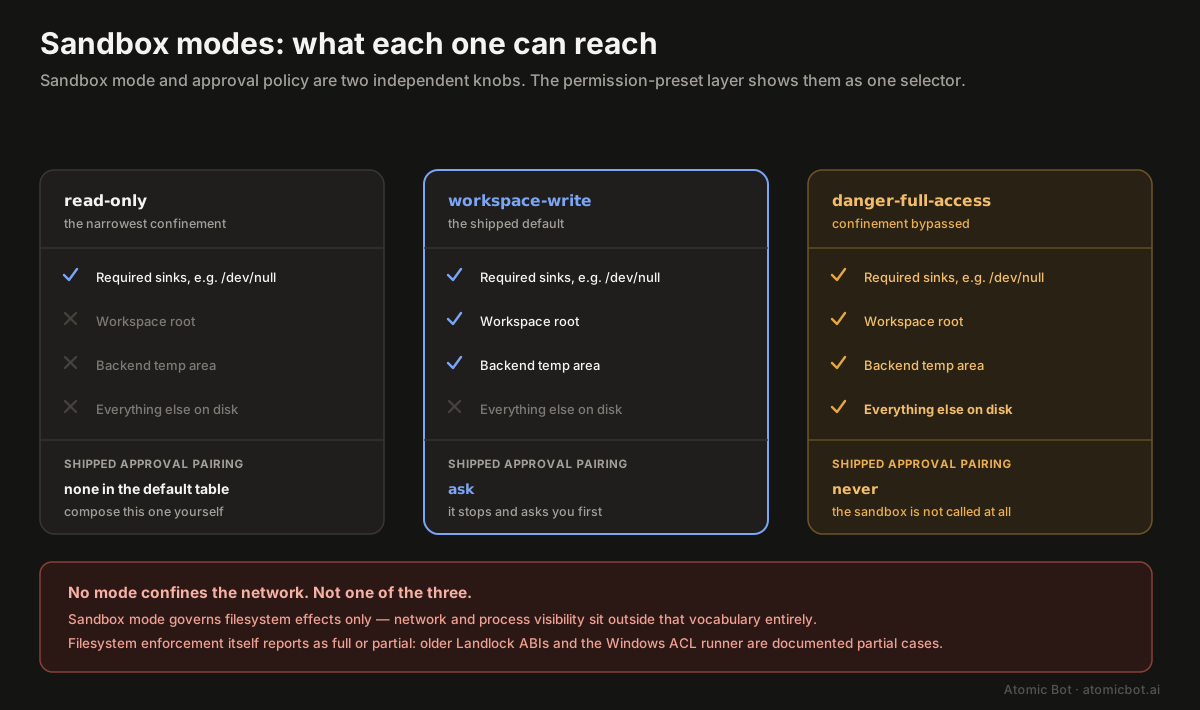
The sandbox stops at the filesystem, and even there not always completely. The scope limit is quoted below. The second half is quieter: enforcement is reported as either full or partial, and older Landlock ABIs and the Windows ACL runner's Everyone and hard-link boundaries are documented as partial cases. A mode that reads as confinement may be governing only some of the effects it names.
The tightest sandbox mode is not one of the shipped presets. The default permission table ships two: workspace-write paired with ask, and danger-full-access paired with never. read-only has no pairing in it. The narrowest posture is the one you have to compose yourself, which is the wrong way round for a preview.
The cordis preset hands the model the runtime. It runs model-written JavaScript against the live process, a broader grant than the other three presets, and one worth selecting deliberately rather than trying out to see what it does.
There is nowhere to file a bug. The Issues tab is disabled, which the GitHub API confirms, and the README routes reports to Discussions. That is a reasonable choice for a project with no external consumers yet, and it also means no issue tracker to search before you hit something.
Which models does DeepSeek Harness support?
Any model you hold credentials for. The llm-deepseek adapter's catalog lists two by default, deepseek-v4-flash and deepseek-v4-pro, both with a 1,000,000-token context window, a 256,000-token default output cap and four reasoning levels (off, low, high, max) with high as the default.
Other providers arrive through the generic adapter dsh-llm-pi-ai, whose catalog covers Anthropic, OpenAI, Bedrock, Vertex, Azure and Codex, added through Settings → Models → Add provider. The credentials are the catch: Bedrock, Vertex, Azure and Codex authenticate natively, and an API key in the generic field does not configure them.
Custom providers. OpenAI-compatible gateways are configured in settings.yaml. A hand-entered model is treated as text-only until declared otherwise, because an endpoint cannot be queried for the modalities it accepts:
models:
  - id: vision-preview
    input: [text, image]
How does DeepSeek Harness work?
Underneath dsh sits Cordis, a meta-framework in which plugins contribute services, typed events and reversible effects to a shared context. Registrations are themselves effects, so they unwind when their plugin unloads.
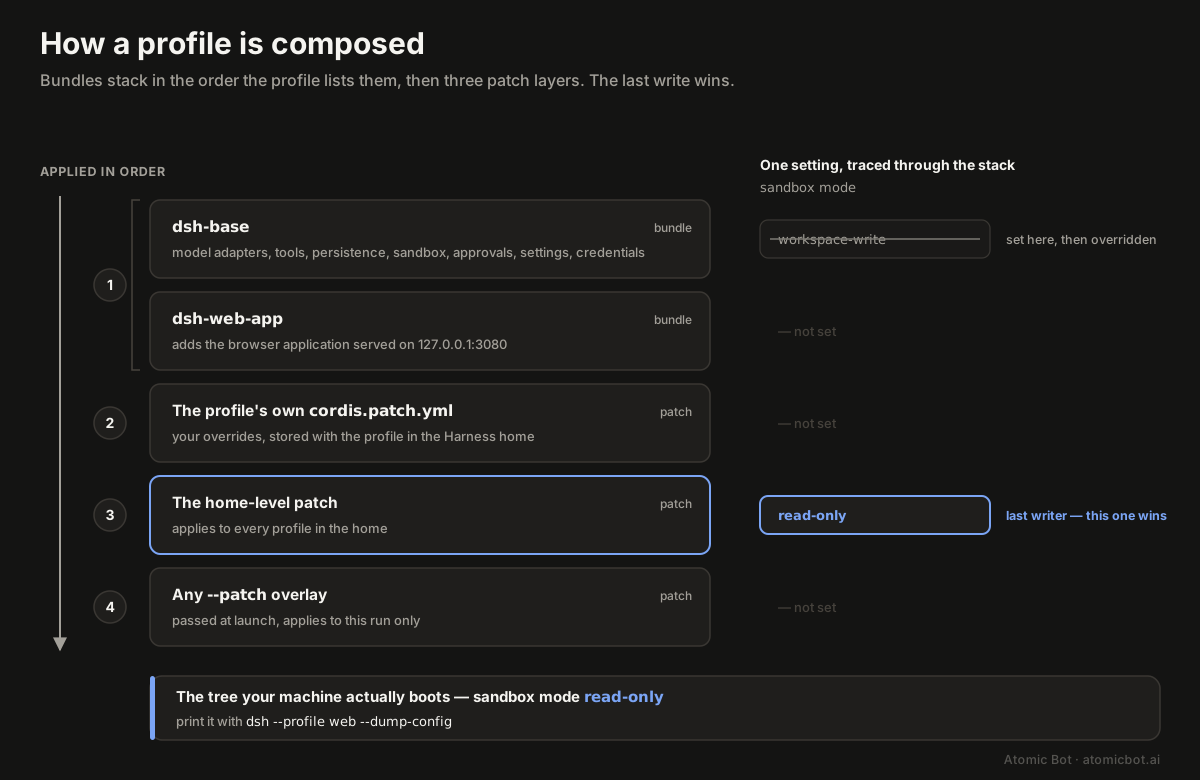
Profiles and bundles. A profile is a named composition stored in the Harness home; web and headless ship as templates. Bundles are how the layers are distributed: dsh-base comes first in every profile with model adapters, tools, persistence, sandbox and approval policy, settings, credentials and telemetry, then dsh-web-app adds the browser application or dsh-headless a one-shot runner. They resolve in the profile's listed order, then the profile's patch, then the home-level patch, then any --patch passed at launch. To print the tree your machine actually boots:
dsh --profile web --dump-config
Capability seams. A seam is a swappable capability: a service definition, a provider implementing it, a consumer using it. Filesystem and subprocess providers share one execution world, so a single provider swap moves Bash, PTY and LSP together, which is what lets the same composition run locally, in a container, or against a remote machine.
The session log. Everything the model sees comes from an append-only event log, and fork, resume, transcripts, telemetry and persistence all derive from that stream. A runtime invariant governs it: model-visible means logged. Anything reaching a model request has to be reconstructable from the log, and the runtime asserts it.
Agent presets. A preset is a directory holding one agent.cordis.yml that determines which tools and prompt sections a session's model sees. Four ship under apps/cli/config/agent-presets: standard for general work, code for the composition where the model writes programs instead of issuing tool calls one at a time, minimal for the smallest tool surface, and cordis for model-written JavaScript against the live runtime. That last one is a broader grant than the other three.
Two details worth knowing before you go looking for them. DeepSeek's own product page calls that fourth mode Creator, while the directory in the repository is named cordis — the same thing under two names, depending on which document you read. And the product page is more specific than the repository about what minimal is for: it "keeps only a shell tool and a file editor for benchmarking models in a minimal environment", which is why benchmark runs use it.
What happens when you give DeepSeek Harness a task?
Say you type: "Add a --json flag to the export command and update the tests." Here is the path that request takes, traced through the flow the architecture documentation describes rather than a session we recorded.
A step is one model request plus the tools it calls. A turn is zero or more steps: it opens before its first input is claimed, and closes once nothing is owed.
- The harness claims your message and a turn opens.
- It assembles the prompt. Prompt sections and tool schemas come from whichever plugins registered them, so the roster depends on the agent preset you picked.
- It fires
agent/pre-step, where a plugin may rewrite or reject what the model is about to see. This is where a redaction plugin would strip a secret out of the request. - It appends your message to the session log and derives the model's history from it. The log is the record; the conversation is a view of it.
- It streams the response, running tool calls through a pipeline with pre-execute and post-execute hooks. Sandbox mode decides here: under
workspace-writethe edit to the test file lands, underread-onlyit is refused before reaching disk. - Work is still owed, so the harness claims again and takes another step: run the tests, read the failures, patch. When nothing is owed, the turn closes, and the whole run sits in an append-only log you can fork.
Every one of those stages is an extension point. That is what "the agent loop is a plugin" means in practice: you are not wrapping the loop, you are registering inside it.
How to install DeepSeek Harness
The root package.json declares Node ^22.19.0 || >=24.0.0 and pins pnpm@11.7.0.
npx @deepseek-ai/dsh web
That starts the Web UI at http://127.0.0.1:3080. The default port is 3080; several published guides state 3018, which does not match the README.
From source:
git clone <https://github.com/deepseek-ai/deepseek-harness.git>
cd deepseek-harness
pnpm install && pnpm run build && pnpm dsh web
The npm registry points both latest and next at 0.1.0-rc.7, out of seven versions, with the first push on August 10, three days before the repository went public. That is the number to watch: it moved twice in the week this article was written, and pinning it is on you. On a managed Atomic Bot deployment the pinning is not.
Is DeepSeek Harness safe?
DeepSeek is a Chinese company and its API is hosted accordingly, so this is a fair question to ask before installing anything. Here is what the repository actually does.
Your API key stays on your machine. Keys are written to $DSH_HOME/.credentials.yaml and the settings file holds only a reference. The Web UI accepts a credential and never returns it: after saving, the page receives a redacted descriptor rather than the secret.
Your prompts go wherever you point them. The llm-deepseek adapter defaults to https://api.deepseek.com, so a default install sends requests to DeepSeek. Configure an Anthropic, OpenAI, Bedrock, Vertex or Azure route and requests go there instead. Point a custom provider at a self-hosted endpoint and nothing leaves your network. The harness has no route of its own.
Telemetry is optional and goes where you send it: session reporting is a separate capability, not part of the agent loop.
What the agent may touch on your machine is governed by two knobs: sandbox mode and approval policy, bundled into named presets shown as one selector. Three sandbox modes ship, widening from read-only through workspace-write to danger-full-access, and enforcement is platform-specific: bwrap and Landlock on Linux, Seatbelt on macOS, an ACL restricted-token runner on Windows.
One limit is worth stating plainly, because it decides whether the tool fits at all:
The sandbox does not cover the network. DeepSeek's sandbox documentation: "SandboxMode governs filesystem effects only. ... Network and process visibility are outside this vocabulary."
Is DeepSeek Harness stable enough for production?
No, and the project says so. It is labelled a developer preview, and the README states: "THERE WILL BE COMPATIBILITY-BREAKING CHANGES." The contributor guide adds that with no external consumers yet, the project prefers the correct foundation over compatibility shims and will rename or repackage freely.
The practical instruction that follows: pin an exact version, and treat recorded sessions as disposable until the format is versioned.
How we checked this. We read the repository rather than running it. Every architectural claim here traces to docs/architecture.md, a package README or the source tree of 0.1.0-rc.7, and the numbers come from the GitHub and npm APIs rather than from other articles.
Two things we could not verify. Several third-party guides publish a dsh plugin add command that is not documented anywhere in the repository, so it is absent here rather than repeated. And DeepSeek's retention policy for API traffic is not in this repository at all: it lives in DeepSeek's own terms, which anyone with a compliance requirement should read directly.
DeepSeek Harness vs Claude Code and Codex
DeepSeek Harness is a runtime you compose; Claude Code and Codex are finished coding agents. That is why the comparison is not a choice: dsh ships subagent providers that delegate to both, so it can run either one inside itself and hand it a task.
Claude Code is the more capable thing to use today. dsh is the more interesting thing to build on.
Seven subagent providers ship in the 0.1.0-rc.7 package listing, and two of them are other companies' coding agents. subagent-claude-code invokes the official Claude Agent SDK inside the delegating session's workspace and returns one final answer; subagent-codex does the same through codex app-server --stdio, opening one ephemeral thread per run. The remaining five cover any Agent Client Protocol agent, a full peer harness over stdio JSON-RPC, and in-process children that either see no parent history or start seeded with the parent's completed turns.
A subagent here is a contractor: it gets one self-contained task, works in its own context, and returns only the finished answer. The Claude Code provider reports inheritsParentContext: false, so the child receives the task text and the working directory, not the conversation, persona or tool filter. Hooks bridge the same way, with hooks-claude-code and hooks-codex running the supported subset of an existing config.
DeepSeek Harness vs OpenClaw
OpenClaw is an assistant you install and use; DeepSeek Harness is a runtime you build on. OpenClaw has nine months of releases and a stable install path behind it, dsh has five days and a release-candidate version number. Pick OpenClaw to get work done today, dsh to compose your own agent.
Two further differences follow from that. OpenClaw has a large body of community guidance, while for dsh the documentation is the repository. And where OpenClaw exposes extension points around a finished product, dsh makes the agent loop itself a plugin you can replace.
OpenClaw ships with a documented minimum spec, a gateway, and an established skills ecosystem. If you are choosing an assistant to run rather than a runtime to build on, that is an OpenClaw vs Hermes Agent question.
DeepSeek Harness FAQ
How to run DeepSeek Harness without installing it
Running it yourself means owning the moving parts: the right Node version, pnpm@11.7.0, a DEEPSEEK_API_KEY in a credential file, a sandbox mode chosen deliberately, and a package that moved from rc.6 to rc.7 in a single day while this article was being written. The first run is the easy part; keeping up with a package that moved twice in one week is the recurring cost.
Running it on Atomic Bot means none of the above. The runtime, the Node version and the version pinning are ours; you pick the agent and open the Web UI.
Then there is the comparison itself. Atomic Bot runs OpenClaw, Hermes Agent, Codex and DeepSeek Harness under one account, so the same task can go through four agent harnesses in an afternoon and you keep the one that fits.
Start at atomicbot.ai.