.svg)


You've probably done this a hundred times: open a fresh chat, paste in the project context, the file structure, your tone preferences, how you like reports formatted – the list is endless. And it is twenty minutes of setup before the actual work starts. Tomorrow, you’ll do it all over again.
Most AI-models don't remember anything between sessions. It’s “execute, reset, execute, reset” time after time. Six months later you get a bigger API bill and the same morning ritual.
Hermes is one of the first open-source agents built to close that gap. Instead of treating every task as a fresh start, it watches itself work, writes down what succeeded, and reuses those notes as skills the next time around.
🔀 What is Hermes Agent and How is It Different From OpenClaw?
Unlike OpenClaw – a gateway-first platform where you define a structured workflow and the system executes it reliably – Hermes is a self-improving AI agent runtime built by Nous Research, designed to get better at your specific tasks over time through a closed learning loop.
In a nutshell, Hermes trades day-1 simplicity for long-term improvement and security. While OpenClaw trades day-1 speed for risk and static performance. So, the right pick depends on how much your workflows actually change.
🧩 Technical Architecture – a reader-friendly version
Hermes is built on 5 core layers:
1. Agent Core (Decision-Making Engine)
The brain of Hermes. This is the LLM (language model) that processes:
- User input: "What are this week's sales trends?"
- Available tools: What the agent can call (database query, web search, file access, etc.)
- Memories: What it knows about you, past workflows, user preferences
- Current context: What's happening right now, what state the system is in
The agent core doesn't just respond to questions – it decides what action to take next. Should it query data? Call a function? Check memory? Ask clarifying questions? This decision-making is what separates Hermes from OpenClaw: Hermes learns from decisions over time, while OpenClaw follows static workflows that don't adapt.
Real example: User asks "Send a report to my team." The agent core decides:
- Which report? (checks memory for context)
- Who is "my team"? (looks up contact list)
- What format? (email, Slack message, etc.)
- When? (now or scheduled?)
- What data? (pulls from databases)
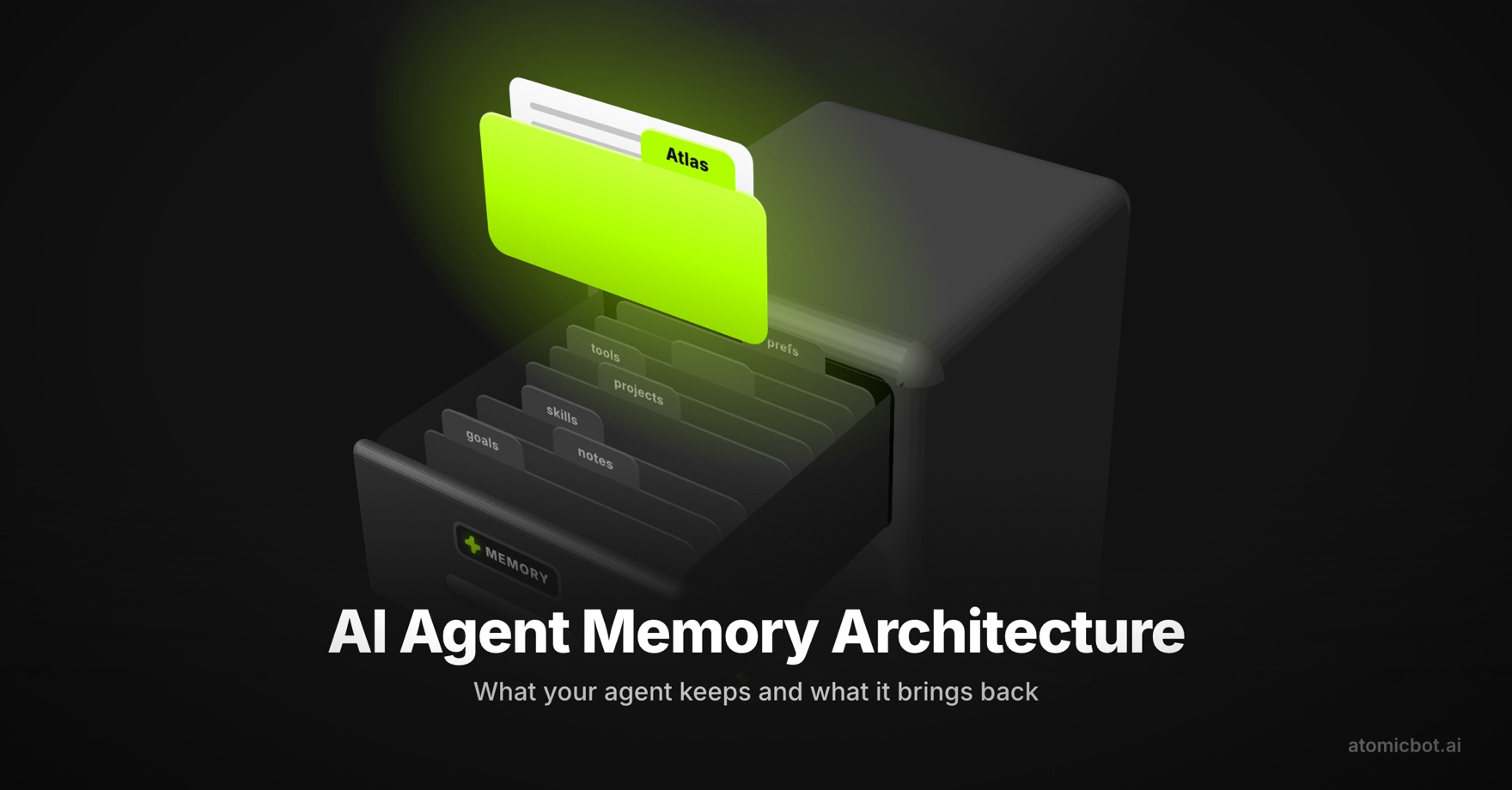
2. Persistent Memory (Long-Term Context)
Unlike most AI systems that start fresh each session, Hermes remembers.
What it stores:
- User profiles: Your preferences, communication style, role, team structure
- Task history: What you've asked before, what worked, what failed
- Learnings: "User always wants reports by Friday morning" or "This user prefers JSON format"
- Relationships: Who works with whom, organizational structure
- Context files: Documents you've uploaded (playbooks, guidelines, company info)
How it works:
- Two small markdown files that survive between sessions. MEMORY.md stores facts about your environment ("project is a Rust web service," "this server runs Ubuntu") . USER.md stores facts about you ("prefers JSON output," "wants reports by Friday morning"). Both are capped in size so they stay relevant instead of growing into a junk drawer.
3. Skill Library (Self-Generated Procedures)
The most unique part of Hermes.
What are skills? Reusable workflows that the agent wrote itself. A skill is a markdown file that says: "When someone asks X, here's the procedure I learned works best."
Day 30: User says "Analyze sales data" Hermes recalls: "Last time they wanted regional focus" → adds that automatically
Example skill file (auto-generated by Hermes):
# Weekly Sales Report Skill

**When to use:** Every Friday, user wants sales analysis
**Steps:**
1. Query database for sales data (last 7 days)
2. Group by region and product line
3. Calculate week-over-week growth
4. Identify top performers and underperformers
5. Generate summary with recommendations

**Accuracy:** 95% (improved after 12 runs)
**Time:** 3 seconds (was 8 seconds when first learned)
**Notes:** User prefers JSON format, send via Slack at 9 AM
How skills are created:
- You ask agent to do something complex
- Agent reasons through it, does it (slowly, from scratch)
- Agent enters "reflective phase": analyzes its own work
- Agent writes a skill file: "This is what worked, here's how"
- Next time, agent skips reasoning, uses skill (10x faster)
Comparing OpenClaw Skills VS Hermes Agent
4. Tool Backends (Where Work Actually Happens)
The agent decides what to do, but tools are what actually execute the work.
Available backends:
- Local: Run on your machine (no cloud, 100% private)
- Docker: Run in containers (reproducible, isolated)
- SSH: Connect to remote servers (on-premise infrastructure)
- Modal: Serverless compute (scales up/down, pay-per-use)
- Vercel Sandbox: Cloud sandbox for web tasks (safe, isolated)
What tools can Hermes call?
- File system: Read/write/edit files
- Databases: Query, insert, update, delete data
- APIs: HTTP calls to external services
- Web search: Browse the internet
- Terminal commands: Run scripts, install packages
- Email: Send messages, read inbox
- Custom tools: Anything you define
Safety: Tools are sandboxed. Agent can't break your system—it runs in controlled environments.
Example: Agent needs to query a database. Which backend?
- Option A: Local (your laptop) – Private, offline, slow
- Option B: Docker (your VPS) – Isolated, scalable, your infrastructure
- Option C: Modal (serverless) – No infrastructure to manage, pay-per-run
atomic.bot handles this choice for you automatically.
5. Messaging Gateway (How Users Talk to Agent)
Hermes isn't tied to one platform. It can listen on any channel.
Supported platforms:
- CLI: Terminal (native Hermes experience)
- Telegram: Message
@yourbot_name - Discord: Mention
@agentin server - Slack: DM or channel mention
- WhatsApp: Text your agent
- Signal: Private messaging
- Email: Send questions via email
- Web UI: Chat in browser (via Hermes Desktop or WebUI)
- Custom: Build your own interface (API available)
How it works: The gateway is a single service that listens on all channels simultaneously. When you message from any platform:
- Message arrives at gateway
- Gateway forwards to agent core
- Agent processes and responds
- Gateway sends response back through same channel
The Problem: Gateway Complexity
Hermes needs a "gateway" – a service that listens to all your messaging channels and routes messages to the agent. Without automation, here's what you're dealing with:
Manual gateway setup. Edit config files, manage YAML, restart services when you change settings. One typo breaks everything.
Platform integration. Get Telegram bot token → Configure Discord webhook → Setup Slack app → Repeat for each platform. Each one has different auth requirements.
Debugging failures. Agent doesn't respond? → Check logs. Message didn't route? →Check gateway logs. Platform crashed? → Find the error in 500 lines of output.
Running 24/7. Keep a terminal window open, or deal with systemd/Docker uptime management. Service crashes? → You need to notice and restart it.
The infrastructure alone may take 2+ hours to set up.
To cut setup from 2+ hours to 15 minutes – use Atomic Bot. It puts a GUI on top of all of this. No config files, no terminal.
Click "Create Agent" – the gateway starts in the background. You never see it. API keys go into a text field; Atomic Bot encrypts and stores them. Adding Telegram means pasting a bot token. Slack is a toggle. The wiring happens automatically.
If something breaks, you get a plain message: "Telegram disconnected" or "API rate limit exceeded" – not a stack trace.
→ Run Hermes in Atomic Bot (macOS)
♾️ How These Layers Work Together
User sends message on Telegram:
"Analyze sales data and send to team"
    ↓
Messaging Gateway (Telegram integration)
    ↓
Agent Core (LLM):
  1. Reads input
  2. Checks Persistent Memory: "User wants regional breakdown, team is Slack #sales"
  3. Looks up Skills: "Found 'sales_analysis' skill, updated 3 days ago"
  4. Decides: Use skill (fast) instead of reasoning from scratch
  5. Calls Tool Backend: "Query database for sales data"
  6. Backend executes: Queries database, returns data
  7. Skill runs: Analyzes data, generates report
  8. Checks Memory: "Send via Slack at 9 AM on Fridays"
  9. Schedules: If it's Friday, sends now. Otherwise, schedules for Friday 9 AM
    ↓
Response: "Report scheduled for Friday 9 AM in #sales channel"
    ↓
Back through Messaging Gateway to Telegram
You see, every layer works together, making Hermes get smarter and this is why Hermes is more than just a model – it's a complete system designed to work autonomously.
🎯 Deep Dive: Where the OpenClaw/Hermes Differences Show Up
Both systems are free to run, both are open-source, and both can be installed natively on your own machine if you're comfortable with Docker and config files. They can also both be set up through Atomic Bot, which handles the gateway, integrations, and uptime in a GUI instead of YAML, so setup time on either side comes down to roughly the same window for a non-technical user.
→ Run Hermes in Atomic Bot (macOS)
→ Run Openclaw in Atomic Bot (macOS)
→ Run Openclaw in Atomic Bot (Windows)
The differences worth knowing about are smaller and more specific than the setup story.
Different flow, Different strong usage cases
OpenClaw’s model is the opposite of Hermes by design: you describe the workflow, OpenClaw executes it the same way every time, and the agent does not try to improvise.
The flow:
- You write a workflow (in YAML) or install a skill from ClawHub, OpenClaw's community marketplace
- OpenClaw parses the workflow and understands the steps.
- Each step runs in sequence: tool call, result, next step.
- The result is reproducible. Same input, same output, every time.
However, this is more reliable by construction. OpenClaw was designed for the kind of work where you genuinely don't want creativity from the agent.
If you're running a billing pipeline, generating compliance reports, automating a customer onboarding sequence, or doing anything that has to be auditable later, the last thing you want is an agent that quietly decides to do things a little differently this week. OpenClaw runs the same steps in the same order every time, which makes the output predictable, version-controlled, and easy to debug when something goes wrong.
Hermes is better when you can't fully define the task upfront. OpenClaw needs a workflow file — if you can't write down every step in advance, it won't help you. Hermes reasons through ambiguous tasks, adapts when something unexpected happens mid-run, and over time builds judgment about how to handle a whole class of work. For personal productivity, open-ended research, or anything where the requirements shift regularly, that's the difference that actually matters.
Security and skill sourcing
OpenClaw's skill model leans on ClawHub, the community marketplace. That gives you broad coverage from day one but it also means you're installing code written by other people, which is a normal supply-chain consideration shared by npm, PyPI, and any package ecosystem.
In March 2026, a ClawHub audit flagged 341 entries as malicious, and the team has been tightening publishing checks since. The practical advice is the same as for any package registry: prefer verified publishers, review what a skill does before granting it filesystem or network access, and pin versions in production.
Hermes works differently because there isn't a marketplace. Skills are generated by the agent and stored locally on your machine, so there's nothing central to compromise but also no community library to pull from. Each approach has a clear tradeoff: ClawHub gives you immediate coverage at the cost of marketplace hygiene; Hermes gives you full local control at the cost of building your own skill set over time.
API and infrastructure cost
Both are free at the runtime level. Ongoing cost depends almost entirely on the LLM you connect (local model, OpenRouter, OpenAI, Anthropic) and the volume of tasks. Hermes' learning loop skips reasoning steps on tasks it has already learned, which in principle reduces token usage on recurring work — though the actual savings depend on task type and frequency.
🦞 Hermes VS OpenClaw: When to Use Each
Many people who discover Hermes arrive there while searching for OpenClaw alternatives. That’s a useful framing, but slightly off: Hermes isn’t a drop‑in replacement for OpenClaw’s deterministic workflows, it’s a different answer to a different class of problems. The tradeoffs are adaptation and long‑term learning instead of strict reproducibility.
Hermes tends to fit when
- Your work is recurring, and you'd like the agent to settle into your patterns over time
- You want everything to live locally, with no external skill registry involved
- You're optimizing for a personal or small-team setup that gets more useful with use
OpenClaw tends to fit when
- Your workflows need to be reproducible across runs (compliance, audit, billing)
- You want broad ready-made tool coverage from day one through ClawHub
- You prefer workflows defined as YAML files that fit into normal git and code-review flows
- You value the depth of an established ecosystem and community
Running both side by side:
Sometimes you don't actually have to pick. If it makes sense for your setup, you can run both and get the best of each:
- OpenClaw handles the workflows that need to be deterministic and version-controlled, Hermes handles the recurring tasks that benefit from a learning loop.
Atomic Bot can host both runtimes in the same app, so you can route different jobs to different agents without maintaining two separate stacks.
For the specific requirements, supported integrations, and how the combined setup actually looks in practice, the breakdown is here: Hermes Agent vs OpenClaw.
🔧 Setting Up Hermes with Atomic Bot
If you're choosing Hermes and don't want to spend an afternoon in YAML and Docker logs, Atomic Bot is the path of least resistance.
Step 1: Download.
Go to atomicbot.ai/hermes and install the desktop app. About 150MB, no special permissions needed.
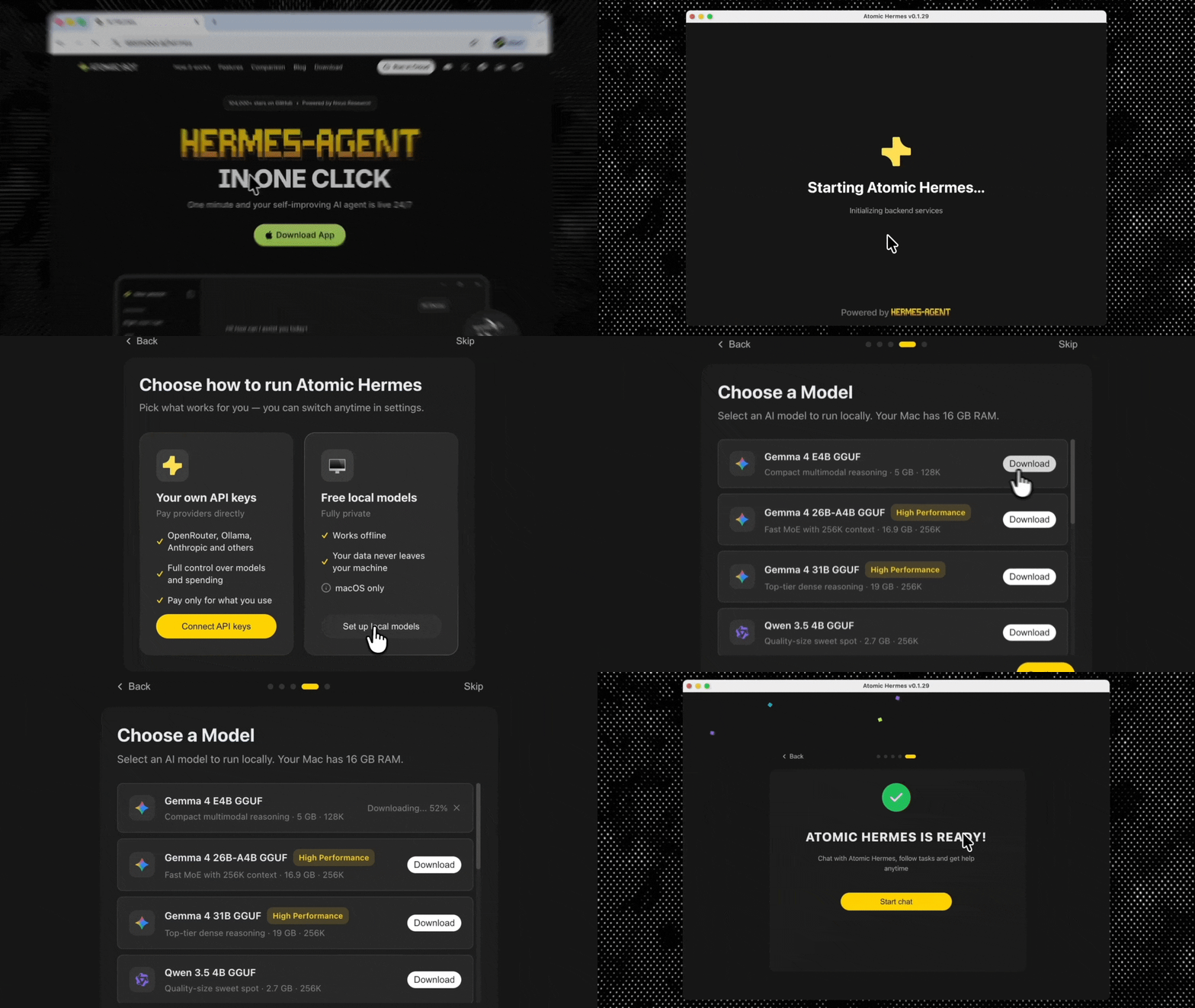
Step 2: Create the agent. Open the app, click "New Agent," pick "Hermes Agent." A three-step wizard handles it:
- LLM provider (free OpenRouter tier, your own API key, or a local model)
- Agent name and description
- Tool permissions (filesystem, web, terminal, restricted by default)
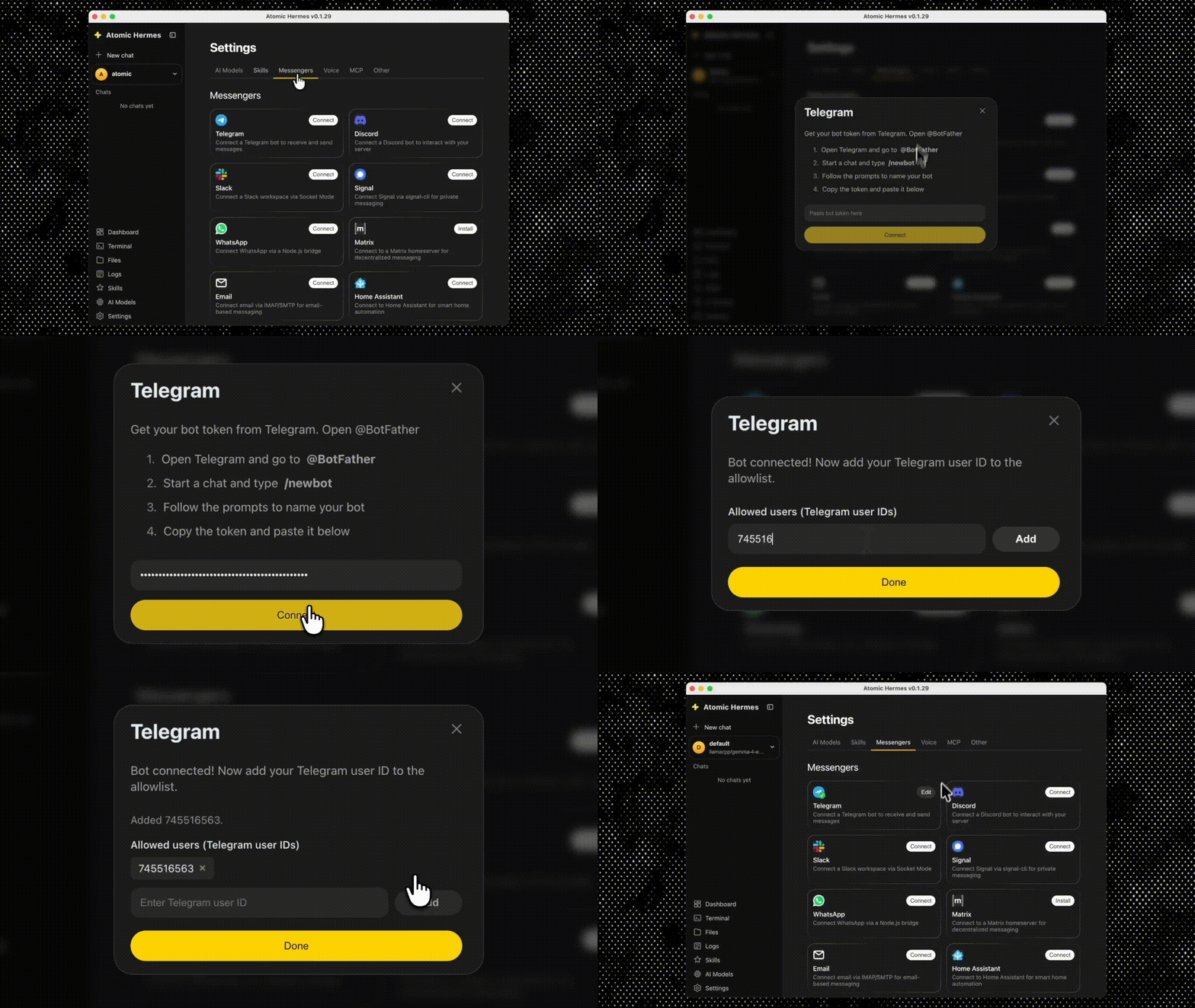
Settings → Integrations. Pick Telegram, Discord, Slack, WhatsApp, or Signal. Paste the bot token. Toggle on. Atomic Bot handles the webhook plumbing, key encryption, and uptime in the background.
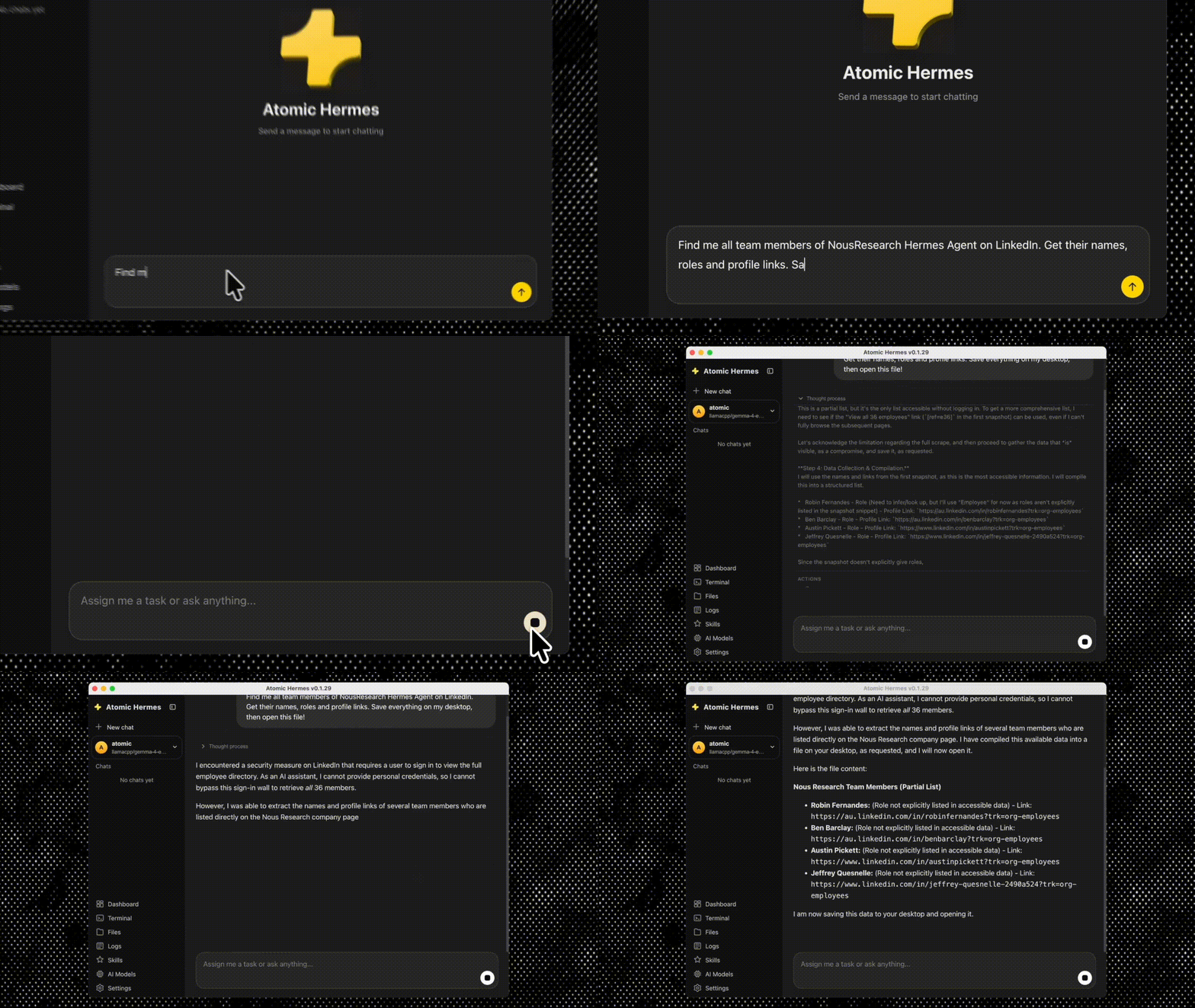
Step 4: Send a message. Directly in the app . The agent decides what tools to call, calls them, and replies.
No YAML, no terminal, no Docker.
🔎 Drawbacks and Things to Watch Out For
Hermes is a good tool, but it isn't a free lunch and it isn't the right fit for every workload. Here are the things worth knowing before you commit, so you don't discover them three weeks in.
Hermes drawbacks at a glance
1. Learning loop only pays off if your work actually repeats. If most of your tasks are genuinely one-offs, Hermes will spend cycles reasoning from scratch every time, and you'll get most of the cost with little of the upside.
2. Quality drift is another thing to watch, because Hermes edits its own skills based on what it thinks worked, which means it can drift away from what you actually wanted if nobody reviews the output.
- Recommendation: set a recurring 15-minute review of new and modified skill files at least for the first month, otherwise you can end up with an agent that's confidently doing the wrong thing faster than it used to do the right one.
3. A real hardware floor to be aware of:
- a 7B model on consumer hardware will work for simple tasks, but you'll hit the ceiling quickly on anything that needs real reasoning.
- 70B model needs a serious GPU — expect at least 40GB VRAM for a quantized version, more for full precision.
- If you're running on a cloud API instead, your costs will look like a normal LLM bill, at least for the first few weeks before skills start saving inference calls.
4. No community library to lean on, which means you don't inherit anyone else's good work and porting a workflow between two Hermes instances isn't as clean as installing a community package would be. If you're a small team, that ownership is fine and probably preferable. If you're a large team trying to standardize behavior across many agents, it can become real friction
❓FAQ
Can I run Hermes without Atomic Bot?
Yes. Native Hermes (terminal/Docker), Hermes Desktop, or Hermes WebUI all work. Atomic Bot is the easiest path for non-developers.
Will my OpenClaw skills work in Hermes?
Not directly. You'll adapt them, or let Hermes regenerate equivalents from a few example runs.
Is Hermes better than OpenClaw?
Different problem. Hermes is better at adaptation and personalization. OpenClaw is better at deterministic execution and broad ready-made coverage. Pick based on workload, not hype.
Can I run both?
Yes, and many teams do. OpenClaw for production-grade reproducible workflows, Hermes for recurring tasks that benefit from learning.
How much does Hermes cost?
Free, open-source. You pay for infrastructure (VPS, GPU if local) and LLM API calls if you use a cloud model.
Does Hermes work with Telegram, Discord, Slack?
Yes. All connect through Atomic Bot or native gateway config.
Which AI Agent Should I Choose?
Choose Hermes if you want an agent that personalizes itself, you care about local-only operation, your work is repetitive enough to benefit from a learning loop, and you want easy setup through Atomic Bot.
Choose OpenClaw if you need reproducible workflows, your procedures are stable, you want immediate access to a mature skill ecosystem, and you're comfortable maintaining YAML.
Or run both. Pair OpenClaw's reliability for critical workflows with Hermes' adaptation for recurring tasks.