.svg)



Obsidian is a note-taking app. It keeps everything as plain markdown files in a folder on your disk, called a vault, so there is no database behind it and no service to call.
Hermes Agent is an open-source AI agent from Nous Research that runs on your own machine. It works with files through ordinary read, search and edit tools.
Those two facts are why connecting them takes so little. To Hermes, your notes are just files it already knows how to handle.
There are three ways to do it, and the first one needs no plugin at all.
Three ways to set up the Hermes Agent Obsidian integration
Does the Hermes AI agent need an Obsidian plugin at all? Method 1 is already installed and takes one line of config, so for many setups the answer is no. Add Console when you want to hand the agent a highlighted paragraph without leaving the editor. Add the Agent plugin when you want the conversation in a panel, or when Hermes runs on a different machine from Obsidian. Both plugins need Obsidian 1.7.2 or newer and neither runs on mobile. A fourth route through MCP is covered under advanced setups.
Before any of it, hermes --version has to answer from a terminal. Both plugin routes are driven from the command line, and if the CLI is unhealthy no plugin setting will fix it. If that command fails, start with what Hermes Agent actually is.
Method 1: Hermes Agent Obsidian skill setup with OBSIDIAN_VAULT_PATH
Hermes ships this skill as Obsidian, at skills/note-taking/obsidian, marked Bundled (installed by default), MIT licensed, authored by Teknium and the Hermes team, and supported on Linux, macOS and Windows.
It reads OBSIDIAN_VAULT_PATH, by convention from the .env file in your Hermes home. Left unset, it falls back to ~/Documents/Obsidian Vault, which is right only if you have never moved your vault.
mkdir -p ~/.hermes
echo 'OBSIDIAN_VAULT_PATH=/Users/you/Documents/MyVault' >> ~/.hermes/.env
On Windows that file lives under %USERPROFILE%\.hermes; add the same line with a Windows path.
Give it a full absolute path rather than a tilde. The file tools don't expand shell variables, so passing $OBSIDIAN_VAULT_PATH straight to read_file fails; the skill's own instructions tell the agent to resolve it to a concrete path first. Start a fresh Hermes session, then confirm it took by asking the agent to list the markdown files in your vault.
The skill teaches four operations against the vault as files:
- Read a note by absolute path, with line numbers and pagination rather than dumping the file
- Search filenames or contents, scoped to
.mdwhen you only want notes - Create notes with full markdown, including
[[wikilinks]]to related material - Edit in place with anchored patches, so a change to one section doesn't rewrite the note
Between them these cover the requests most people install a plugin for. "Summarise this week's meeting notes and link the sources" works here, with no further setup.
Method 2: how to install Hermes Console
Console runs a shell in the Obsidian sidebar through node-pty, rendered with xterm.js. Its reason to exist is the context bridge, which sends whatever you have highlighted to the agent when you flip a per-tab toggle and press Enter.
- Install the Hermes-side bridge. Without it the toggle does nothing, and this is the step people skip.
hermes plugins install dannyshmueli/obsidian-hermes-console --enable- It appears in your plugin list as
obsidian-context-bridge. - Install the Obsidian plugin. Settings → Community Plugins → turn off Restricted Mode → Browse → search Hermes Console → Install → Enable.
- Match the name exactly, because the browser returns namesakes. Hermes TTS (1,350 downloads) makes audio from notes. Hermes R2 Vault (46) encrypts notes to Cloudflare R2 for Hermes, related but not an integration. On GitHub there is also
symunona/obsidian-hermes, an unrelated Gemini voice assistant. The two you want are named exactly Hermes Console and Hermes Agent. - Download the native binaries. Settings → Hermes Console → Download binaries. Skip this and the console won't open.
- Open a console from the ribbon icon, then turn on the context toggle for that tab. Fresh tabs run
hermesautomatically when the CLI is on PATH; restored tabs deliberately don't.
The toggle is per-tab and resets on every reload. Binding Toggle note context for active Hermes Console tab to a hotkey makes re-enabling cheap, though nothing makes it persist.
Method 3: the Hermes Agent Obsidian plugin and the gateway
The Hermes Agent plugin by Jason (jsun2020) speaks HTTP to the Hermes gateway and streams replies into a sidebar panel.
The gateway is a separate process from the TUI. Running hermes opens a chat REPL with no HTTP API, so the plugin needs hermes gateway running alongside it. OpenClaw's gateway works the same way if you want the longer background.
Check your plugin version before anything else. In issue #4, the "current note" toggle silently dropped the note whenever the chat input had focus. That was fixed in 0.10.0 on August 3, 2026, and 0.10.1 is current.
- Enable the API server. In
~/.hermes/.env: API_SERVER_ENABLED=true
API_SERVER_KEY=change-me-local-dev- Start the gateway.
hermes gateway runkeeps it in the foreground and dies with the terminal, which suits a first test. For anything ongoing,hermes gateway installfollowed bystartregisters it as a launchd or systemd service that restarts on crash and at login. Either way it listens on port 8642. Hermes Desktop does both steps and generates the key; read it back withgrep API_SERVER_KEY ~/.hermes/.env. - Confirm it's reachable.
# .env is read by Hermes, not your shell, so pass the key literally
curl -H "Authorization: Bearer change-me-local-dev" <http://127.0.0.1:8642/v1/models>- In PowerShell use
curl.exe. JSON means you're good,401means the key doesn't match, connection refused means the gateway isn't running. - Install and configure the plugin. Settings → Community Plugins → Browse → search Hermes Agent → Install → Enable, then open its settings. Base URL
http://127.0.0.1:8642, paste the key, Transport on Auto, Test connection.
Once the gateway is installed as a service it stays up through reboots and crashes without further attention. It won't survive a closed laptop, which matters only if you want the panel reachable from elsewhere; that case is further down.
Hermes Console vs Hermes Agent plugin: which should you pick?
Pick Console if you live in a terminal, want the agent's raw output, or juggle several sessions at once.
Pick the Hermes Agent plugin if you'd rather treat Hermes as a writing collaborator. Beyond the chat panel you get a context gauge showing how full the model's window is, a reasoning-effort picker, and a smart graph that infers semantic links between notes instead of reading only your wikilinks.
They touch different things, Console spawning a shell and the plugin talking HTTP, and no conflict has been reported in either tracker.
Download counts won't settle it: 6,381 for Console against 6,763 for Hermes Agent. Obsidian's registry sums per-version counts into that headline figure, so the plugin that shipped more releases looks more popular. Console shipped 16 releases to Hermes Agent's 10.
Is your Obsidian vault Hermes Agent's memory?
Obsidian AI agent memory is the most common thing people try to build once the agent can read their notes. A vault doesn't become the agent's memory on its own, and understanding why changes how you file things.
Hermes keeps writing to MEMORY.md and USER.md regardless of the vault, because those load into the system prompt at session start and are capped there. A capped, frozen snapshot can't hold a knowledge base. It can hold routing: pointers telling the agent where each category of information lives.
That framing comes from a Reddit walkthrough on using Obsidian as the long-term memory backbone, which treats MEMORY.md as an index over the vault rather than as storage. It isn't in the Nous docs, and it matches how the pieces behave:
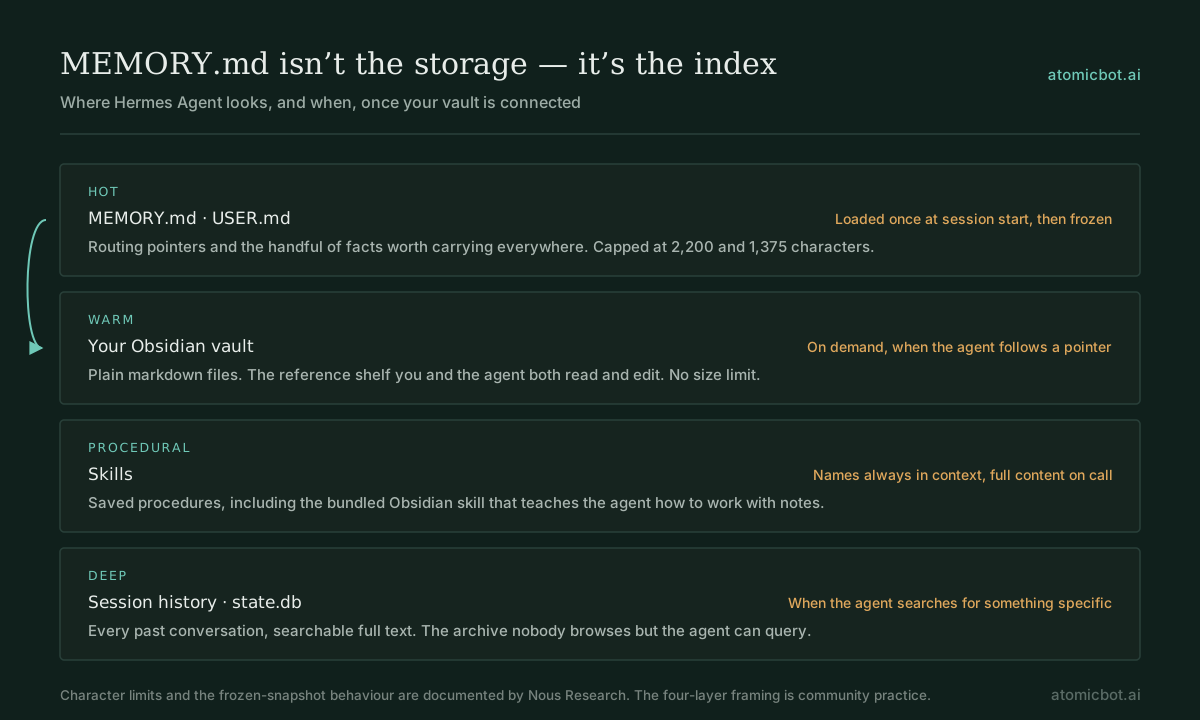
The practical version from the same thread keeps preferences and active projects in hot memory, stable reference material in vault files, and one dated note per day as a timeline. What makes that work is filing discipline rather than configuration. Our own notes on filing habits from long-running Hermes users go further on that.
Two numbers from that thread are worth checking against the docs before you copy them. The 67% promotion threshold reads like a product constant, partly because the Nous docs' own example prompt header happens to show [67% - 1,474/2,200 chars], but Hermes' documented guidance is to consolidate above 80%. And the six-to-nine-thousand-character hot layer described there can't come from stock defaults, which are 2,200 characters for MEMORY.md and 1,375 for USER.md. Both are configurable in config.yaml.
A vault also outlives any one agent. Hermes' memory lives in its own home directory; a vault is markdown on disk, so Claude Code, Codex or anything else that reads files works against the same notes.
Vault or a memory provider?
Hermes ships external memory providers as plugins, one active at a time alongside the built-in files. Run hermes memory setup to see the picker.
A provider resurfaces facts unasked and handles extraction and deduplication for you, at the price of not being able to see what it stored. A vault is the reverse: openable and correctable, but you file everything by hand. Running both over the same facts produces duplication and drift, so keep one canonical home per fact. If the vault is your single source of truth, skip the provider and let MEMORY.md point into it.
Hermes Obsidian access control: how much of the vault to hand over
Both Hermes plugins carry the same registry line, "This plugin has not been manually reviewed by Obsidian staff." So do 4,303 of the registry's 6,911 plugins.
The specific thing to weigh is in the Hermes docs, about the key you paste into the plugin:
The API server gives full access to hermes-agent's toolset, including terminal commands.
Console has no API key and spawns a full shell, which is the broader capability of the two. So the question is how much of the vault each one can reach.
The skill grants no access at all. It is behavioural, teaching the agent how to work with notes, and the boundary comes from somewhere else. A community access-control tutorial puts it as: the skill tells Hermes how to work with the notes, Docker decides which notes it can reach or change.
If your Hermes tools run in a container, access control is a mounting decision. That tutorial splits the vault into three zones: read/write for an inbox or agent workspace, read-only for reference notes where edits fail, and private, where the container sees an empty folder. You see the whole vault; Hermes sees a scoped version.
Outside a container, the Hermes Agent plugin has a simpler lever: the working-folder setting, reached from the folder chip in the chat footer. Leaving it empty gives the agent the whole vault, while pointing it at one folder tells the agent to stay there. That instruction is weaker than a container mount, since nothing enforces it, and it still separates a scoped agent from one with the run of your notes.
Whichever route you take, initialise the vault as a Git repository with a baseline commit, so every agent change is inspectable and reversible. Turn auto-approve off for a day and watch what the agent reaches for; the same default causes the same trouble in OpenClaw, where the mitigations are better documented. And keep .obsidian out of cloud-synced folders, because the plugin's key lives in data.json inside it.
Hermes Obsidian plugin not working? Common fixes
First verify the CLI itself: hermes doctor, then a one-shot hermes chat -q "hello".
Console won't open. Nearly always the native binaries. Re-download them in settings, then restart Obsidian completely. On ARM64 Windows, close every terminal tab first, disable and re-enable the plugin, restart, delete .obsidian/plugins/hermes-console/node_modules/, then retry.
"hermes: command not found". Obsidian's process doesn't pick up your shell's PATH. Point Console's startup command at the CLI's full path, or launch Obsidian from a terminal.
Gateway unreachable. Re-run the curl from method 3. If it answers and the panel still doesn't, the mismatch is in the plugin's Base URL or key.
Selections aren't reaching the agent. Check that .obsidian/hermes/context.json updates when you press Enter. If it does, run hermes plugins and confirm the context bridge is enabled.
The agent sees a different folder than you do. Ask it to run pwd and list the vault folder it can reach. A gateway started from another profile, directory or container resolves paths you never intended.
Replies time out on long vault operations. Raise the request timeout in the plugin's settings.
The agent edited notes you wanted left alone. The most-reported problem in the lessons-learned thread, and expected behaviour rather than a bug. Scope the mount, keep a read-only zone, put the vault under Git.
The agent can't find notes that are definitely there. Usually inconsistent formatting rather than a broken path. The same thread describes letting the agent retrofit consistent frontmatter and tags across an existing vault, one folder at a time, on a Git-committed vault.
Advanced setups
Skip this section unless you hit one of these cases.
The Codex sandbox rejects read-only requests
On the OpenAI-Codex provider, "Two read-only permission requests were rejected" means the Codex sandbox rooted its workspace at the gateway's launch directory and defaults to read-only, while the runs endpoint gives an API client no way to set a per-run working directory.
The plugin author pins the vault in Codex's own config, ~/.codex/config.toml. His version points at the vault root; we scope it to one folder:
approval_policy = "never"
sandbox_mode = "workspace-write"

[sandbox_workspace_write]
writable_roots = ['/Users/you/Documents/MyVault/AI Workspace']
network_access = true
Restart the gateway afterwards, since Codex reads this at startup. Setting approval_policy to never cancels the approval prompts described under access control, so narrow writable_roots to one folder inside the vault rather than relying on being asked. Leave network_access off unless your workflows fetch things.
Several profiles on one machine
Every profile's API server binds 8642 unless you change it, with no auto-allocation. The docs' multi-user example assigns ports by hand, alice on 8643 and bob on 8644, and the plugin README gives the range as 8643 to 8742. Enabling gateway.multiplex_profiles puts profiles behind one listener with a per-profile URL prefix instead.
Giving one profile vault access and another none circulates as a way to separate agents. Hermes documents per-profile isolation of config, memory, skills and credentials, but not per-profile mounts, and in the official Docker image profiles share a container and therefore one set of mounts. Separate containers per profile is what actually holds.
Corporate Windows
CreateProcessWithLogonW failed: 1385 means your account lacks the "Log on as a batch job" right. The plugin author notes that granting it through secedit may be blocked or reverted by Group Policy, which leaves full-access mode as the only one that works there.
Reaching the vault over MCP instead
If you already run MCP, the Local REST API with MCP plugin (684,386 downloads) ships an MCP server at https://127.0.0.1:27124/mcp/ with 16 tools, reaching your notes through the running Obsidian app rather than the filesystem.
Running Hermes away from your desk
Everything above puts Hermes on the machine your vault lives on, which is where most of these setups belong.
Installing the gateway as a launchd or systemd service covers crashes and logins. It doesn't cover a closed laptop, so if you want the chat panel reachable while you're away from that machine, the gateway has to live somewhere that stays up. Atomic Bot runs Hermes as a cloud deployment, $19/month for the Base plan plus $10 per agent instance, which is $29/month for one agent on 4 vCPU, 8 GB RAM and 80 GB storage.
A hosted agent reaches its own filesystem, so this route works only with the Hermes Agent plugin, pointed at a hosted URL instead of 127.0.0.1. The bundled skill and Console both need Hermes on the same machine as the vault. Use HTTPS, because that API key carries terminal access and on a public address it is the whole box.
Related: what developers build with Hermes and running Hermes alongside OpenClaw.
Hermes Agent Obsidian FAQ
Get started
Go to atomicbot.ai. Sign in, choose your agent, OpenClaw, Hermes or Codex, and you're running in about five minutes.