.svg)


Hermes Agent launched in February 2026 and crossed 180K GitHub stars faster than most open-source AI projects. The self-improving agent from Nous Research gets written about a lot.
However, what it does in a developer's day-to-day life is documented less clearly, although Hermes agent is good at taking over the parts of development that are repetitive but still need judgment: turning a ticket into a passing test, reviewing a batch of PRs while you unavailable, breaking a complex feature into parallel workstreams and executing them without supervision.
TL;DR
- Case 1: break a complex feature into vertical slices and run them in parallel with sub-agents
- Case 2: go from Jira ticket to passing Playwright tests without touching the keyboard
- Case 3: first-pass PR review on a cron, no CI setup, no webhook
- Case 4: run long sessions locally with live token and tool visibility
- Case 5: skills marketplace, MCP manager, and messenger delivery on top of Hermes, via Atomic Bot
Why use Hermes as a developer
Most AI coding tools work interactively: you write a prompt, get a response – and in most cases it needs some edits and micro-managing – so you write another prompt. Hermes is designed for the opposite pattern: you define a task, it runs and reviews all by itself.
Self-learning loop and persistent skill files
When Hermes completes a task, it can generate a skill file and save it to ~/.hermes/skills/. The skill captures what worked: the tool sequence and the prompt structure that produced it. In subsequent sessions on the same project, Hermes loads the relevant skill instead of working from first principles.
Self-learning ships disabled. The config flag is self_learning = false in config.toml. Nous documentation is explicit about why: auto-generated skill quality varies, and turning it on without reviewing what gets created means Hermes can reinforce a bad pattern across dozens of sessions.
Session replay and checkpoints
Hermes writes a full replay log of every session. If you kill the terminal mid-task, you can resume exactly where it left off. If the agent went in the wrong direction, checkpoints let you roll back to a previous snapshot rather than manually undoing whatever it did to your files.
Without replay and checkpoints, handing off a 4-hour task to an agent is a gamble: you come back and either it worked or you spend an hour figuring out what to undo.
Git worktrees: the agent works in its own branch
Hermes has native git worktree support: the agent works in an isolated branch – your main branch stays untouched until you review the diff and decide to merge. In case if the session goes sideways, you discard the branch – and your working directory stays clean.
Multi-model routing in a single session
Hermes can route different subtasks to different models within one session.And each role – orchestrator, coder, QA – can run on a different model. It means that you don’t need to limit yourself in choosing models, just mix them: use an expensive model for planning, a cheaper and faster one for the bulk of code generation, and a third for checking output.
The production case below is built on this perk.
Five workflows at a glance
Case 1: Feature planning + parallel sub-agents
Coding agents fail most often at planning, not implementation. A vague task like "add multi-tenant support" handed to an agent without breakdown produces bad code at scale. This workflow puts the planning layer first: a set of open-source planning skills (/grill-me, /grill-with-docs, /to-prd, /to-issues) scope and slice the feature, then Hermes sub-agents execute each vertical slice in parallel. Hermes parses the slash-command conventions as skill invocations natively.
What you get: parallel feature implementation with a human gate at the planning boundary, not mid-execution where mistakes are expensive to undo.
Documented by a developer on an existing codebase, April 2026.
Planning pass: grill → PRD → issues
The workflow runs in sequence:
/grill-with-docs on ~/projectA/big-feature-x.mdThis skill asks hard questions about the plan, updates CONTEXT.md and ADRs inline, and builds shared domain vocabulary that makes later sub-agent instructions shorter and more precise.
/to-prd on ~/projectA/big-feature-x.md, create local md PRD not in github
/to-issues on ~/projectA/big-feature-x-prd.md, create local md issues not in github
Before running sub-agents, the developer manually checks the issue split. It needs to be vertical (one path from backend through frontend per issue), not horizontal (all backend first, then all frontend). Horizontal splits create merge conflicts and hide integration problems until late.
Execution with sub-agents
Implement the feature split slices in ~/projectA/big-feature-x-issues.md,
use sub-agents for every issue, and parallelize when possible but carefully.
Halt on tasks that are HITL or otherwise require human input.
Two config flags need bumping before running deep sub-agent chains:
hermes config set delegation.max_iterations 100
hermes config set delegation.child_timeout_seconds 1200
Without these, Hermes hits iteration limits mid-implementation. The human gate stays at the plan-to-code boundary: the developer reviews the issue split, rejects bad breakdowns, and only then lets sub-agents run.
This workflow requires an existing codebase with tests, types, and documented patterns. Not designed for greenfield work.
Case 2: Ticket to automated tests, end to end
Writing tests manually means: reading the ticket, switching to the editor, writing the test, running it, then copying results back. Hermes closes that loop: read the ticket, generate and run the test locally, post results back – no context switching.
What you get: tests written, executed, and reported back to the ticket without you touching the keyboard. From ticket to passing test in one pass. The same flow applies to any ticket system Hermes can read from.
Reading the ticket and writing the test
Hermes connects to Jira and parses the ticket description. In the demo, the ticket was "Login Functionality Verification": user credentials and a target URL to test against. Hermes generated a Playwright test file (test_login.spec.js) matching those parameters, then bootstrapped the test environment with npm init playwright@latest.
Execution and the round-trip back to Jira
Tests ran with npx playwright test in the developer's local environment, not a remote sandbox. That's a meaningful difference: the execution happens on your machine, against the actual service. You can verify it's doing what it claims to do.
After the tests passed, Hermes posted a detailed execution report as a Jira comment. The ticket closed the loop without any manual copy-paste.
Any LLM generates a Playwright test if you paste a spec at it. The difference here is the round-trip: Hermes reads the ticket, runs the test, and posts results back without you opening a second window.
The same pattern on other systems
The Jira demo confirms the flow, so you can apply the same pattern on other systems:
- GitHub Issues: Hermes already has
ghconfigured from the PR review setup.gh issue view <num>gives the same structured input; test generation and report-back are identical. - Linear, Asana, Notion: Hermes supports MCP connectors in Atomic Bot desktop app, so any system with an MCP integration feeds the same workflow
- No ticket system: put requirements in a markdown spec file in the repo, point Hermes at it, and have it generate tests from the spec. No integration needed.
Case 3: Automated PR review on a schedule
Small teams skip code review because there's no bandwidth, or async back-and-forth is too slow. This first-party Nous Research tutorial sets Hermes up as a recurring reviewer: it polls every 30 minutes, posts a review comment via gh, and requires no webhook or CI changes.
What you get: A first-pass review on every PR, automatically. No CI setup, no colleague to wait on, one command to start.
The command
hermes cron create "*/30 * * * *" \
  "Review open PRs on YOUR_ORG/YOUR_REPO opened or updated in the last \
   30 minutes. For each one: gh pr diff <num>, evaluate against the \
   pr-review skill, then post a review comment with gh pr review. \
   If nothing new, respond [SILENT]." \
  --skills pr-review \
  --name "PR review (cron)" \
  --deliver local
--deliver local means the job runs on the machine where Hermes is installed. It uses gh to fetch diffs and post comments. No public URL, no webhook endpoint. Works behind NAT, works on a developer's laptop that stays on during work hours.
The [SILENT] instruction tells Hermes to do nothing and log nothing when there are no new PRs. Without it, you get noise on every polling cycle.
Where this fits
This isn't a CI replacement, but an additional review layer before a human looks at the PR. For a solo developer or a small team, it's a first-pass reviewer with no service to set up and no one to wait on.
Case 4: Running a session locally with the TUI
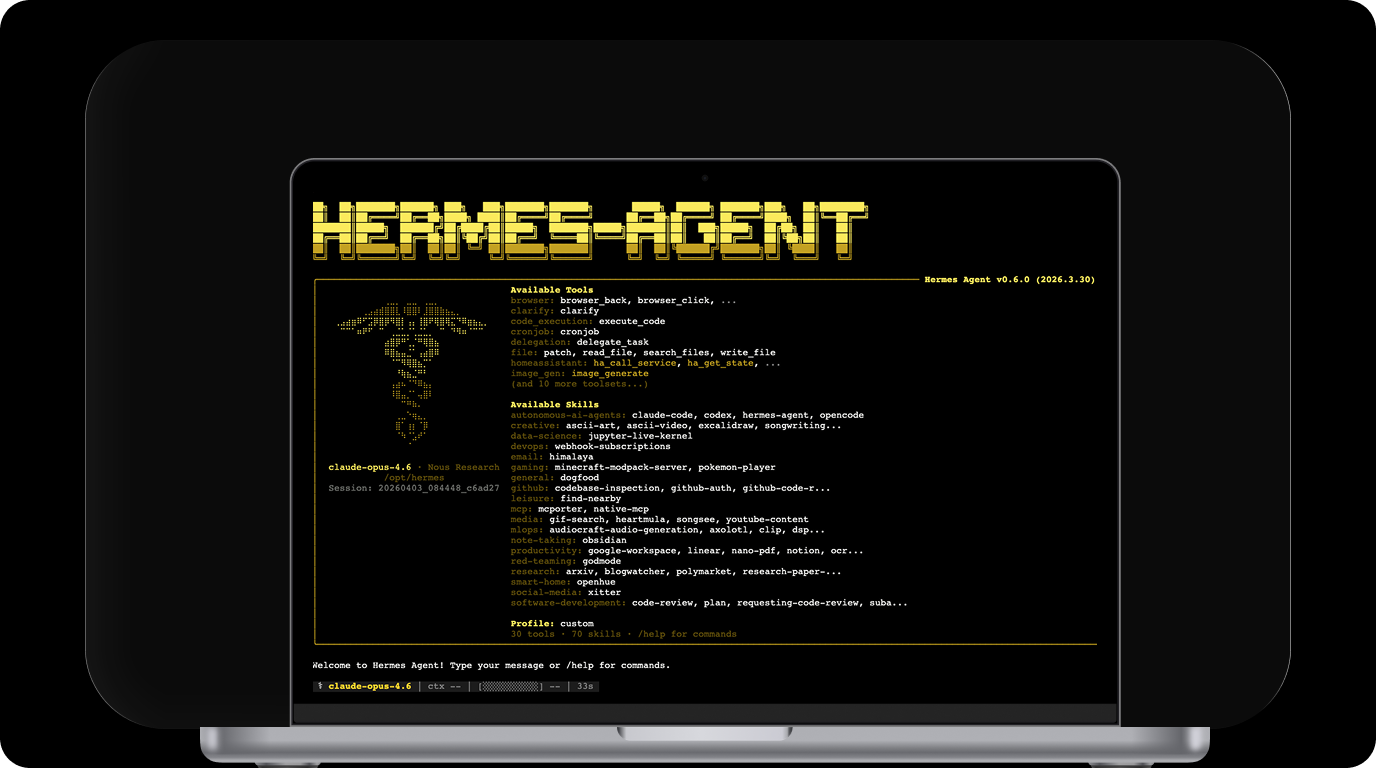
Long agent sessions are opaque: you hand off a task and come back to either a result or a mess. The TUI shows what's happening in real time: model, token usage, context fill, active tool calls, elapsed time. This developer account covers a full local install and blog redesign session, with real screenshots of the TUI mid-run and before/after output.
What you get: live visibility into the session, plus skills that accumulate per project; later runs on the same codebase are noticeably faster.
What local install looks like
Hermes requires Node.js ≥20 and Python. The TUI installs its Node dependencies into ui-tui/node_modules on first launch, a one-time step. hermes doctor checks what's missing before you start.
The developer used GPT-5.5 via API, not a local model. Hermes ran locally; inference happened in the cloud. This is the most common setup for people who want local agent control without 24GB of VRAM.
The TUI status line during the session:
⚕ gpt-5.5 │ 67.5K/272K │ [██░░░░░░░░] 25% │ 4m │ ⏱ 3m 50sModel, tokens used out of available context, context fill percentage, active tool calls, elapsed time. Enough to know whether the session is on track or stuck in a loop.
Skills compound across sessions
The developer described it as a "durable file-based identity": each session adds to the skill library, so Hermes gets faster at your specific project over time. After the first session, it knows your file structure and component patterns. Later sessions on the same codebase are noticeably faster.
Case 5: Hermes with a skills marketplace, MCP manager, and messenger delivery
The raw Hermes install has a setup tax: Node.js ≥20, Python, hermes doctor, manual config.toml. That's before you've written a single prompt. Atomic Bot is a desktop app that handles installation and configuration through a GUI: pick Hermes, pick a model, start a session.
What you get: Hermes on your machine without the dependency chain, plus things the CLI doesn't have at all: a built-in skills marketplace, MCP server management via form, and messenger integrations.
Models: three modes
The AI Models tab has three options:
- Pay as you go: Atomic Bot's own billing, no separate API account needed
- API keys: bring your own key, choose provider and model from a dropdown
- Local Models: run inference on your own hardware, data stays on the machine
Switching models is a dropdown change, not a config.toml edit.
HermesHub: skills without file copying
The Skills tab connects to HermesHub, a marketplace for Hermes skills. Install a skill with one click and it lands in ~/.hermes/skills/ automatically. No git clone, no manual directory copy. Official skills include 1password, agentmail, and adversarial-ux-test.
This matters for Case 1 (planning skills) and Case 3 (PR review skill): instead of finding the repo and copying files, you search HermesHub and install.
MCP servers via form
The MCP tab lets you add any MCP server through a form: name, transport, command, arguments, environment variables, working directory. No JSON config to write by hand. Atomic Bot also ships its own @atomicbotai/computer-use-mcp for computer use tasks.
Messenger connections
The Messengers tab connects Hermes to Telegram, Slack, Discord, Signal, WhatsApp, Email, iMessage, and others. This means you can trigger a session or receive results through a chat message rather than a terminal. Practical for async work: start a session, get the result in Slack or Telegram when it's done. Also useful on teams where some people won't touch a terminal.
When it fits
Good starting point if you want Hermes running without the setup tax. Also the right choice when you need HermesHub skills, custom MCP servers, or messenger delivery and don't want to configure each one by hand.
FAQ
How is Hermes Agent different from Claude Code or Cursor?
Claude Code and Cursor respond to prompts. Hermes runs tasks. Hand it a well-scoped job, it executes unattended and returns a result. The catch: it's harder to redirect mid-run than an interactive tool. If you want to stay in the loop as the agent works, Claude Code is easier to manage.
Can Hermes Agent review pull requests automatically?
Yes, and Nous has an official tutorial for it. A cron job polls every 30 minutes: gh pr diff to fetch the diff, review skill to evaluate, gh pr review to post. Nothing to deploy. Full command in Case 3.
Does Hermes Agent work with Jira?
Yes, and the easiest way to connect it is through Atomic Bot. It ships with a library of MCP connectors (Jira, GitHub, Linear, Notion, and others), one click to add. No config files. See Case 2 for how the full ticket-to-test workflow runs.
Try connect your Hermes to your services through Atomic Bot:
→ Run Hermes on Atomic Bot (macOS)
Can Hermes Agent run local models?
Yes, but the requirements are steep: 32B model minimum, 24GB VRAM, 64K context. Anything smaller drops off on long multi-step tasks. Every case in this article ran Hermes locally against a cloud API. That's the easier entry point for most people.
Does Hermes work on Windows?
Yes, native Windows support is still beta; WSL2 is more stable for now. The TUI needs Node.js ≥20. Run hermes doctor first to catch missing dependencies.
Final word
If a task has a clear definition of "done" and you'd repeat it next week, Hermes is worth trying. That covers most of what's in this article: PR review, test generation, feature breakdowns. Tasks with fuzzy outputs or mid-run judgment calls still need a person watching; debugging a production issue isn't a good candidate.
Skill files are the part that doesn't get written about enough. Each session on the same codebase deposits something: file structure, patterns, shortcuts the agent picked up. It doesn't know your project the first time it runs. By the tenth session, it does, and it shows. A chat window starts fresh every time.