.svg)


Lindy AI is one of the visible names in a fast-moving category: AI agents that do your work independently. Email triage, meeting scheduling, note-taking, lead research, follow-ups, CRM updates. Lindy positions itself as a personal AI employee that runs in the background and gets better the more it sees how you work.
This guide explains what Lindy actually is in 2026, how its agent model works under the hood, what every plan costs, where users are happy and where they aren't, and which alternatives make sense depending on what you need.
🔎 What is Lindy AI agent
In one sentence: Lindy is a cloud AI assistant and agent builder that connects to your tools, watches for triggers, reasons about what to do, and takes action on your behalf, billed on usage.
In more than one sentence:
Lindy AI is a cloud-based personal AI assistant and platform for building AI agents that automate work. The company positions each agent as an "AI employee" (Lindy calls them "Lindies") that can be assigned a goal, given access to your apps, and left to carry out multi-step tasks with limited supervision.
You can use it as:
- Your personal work assistant
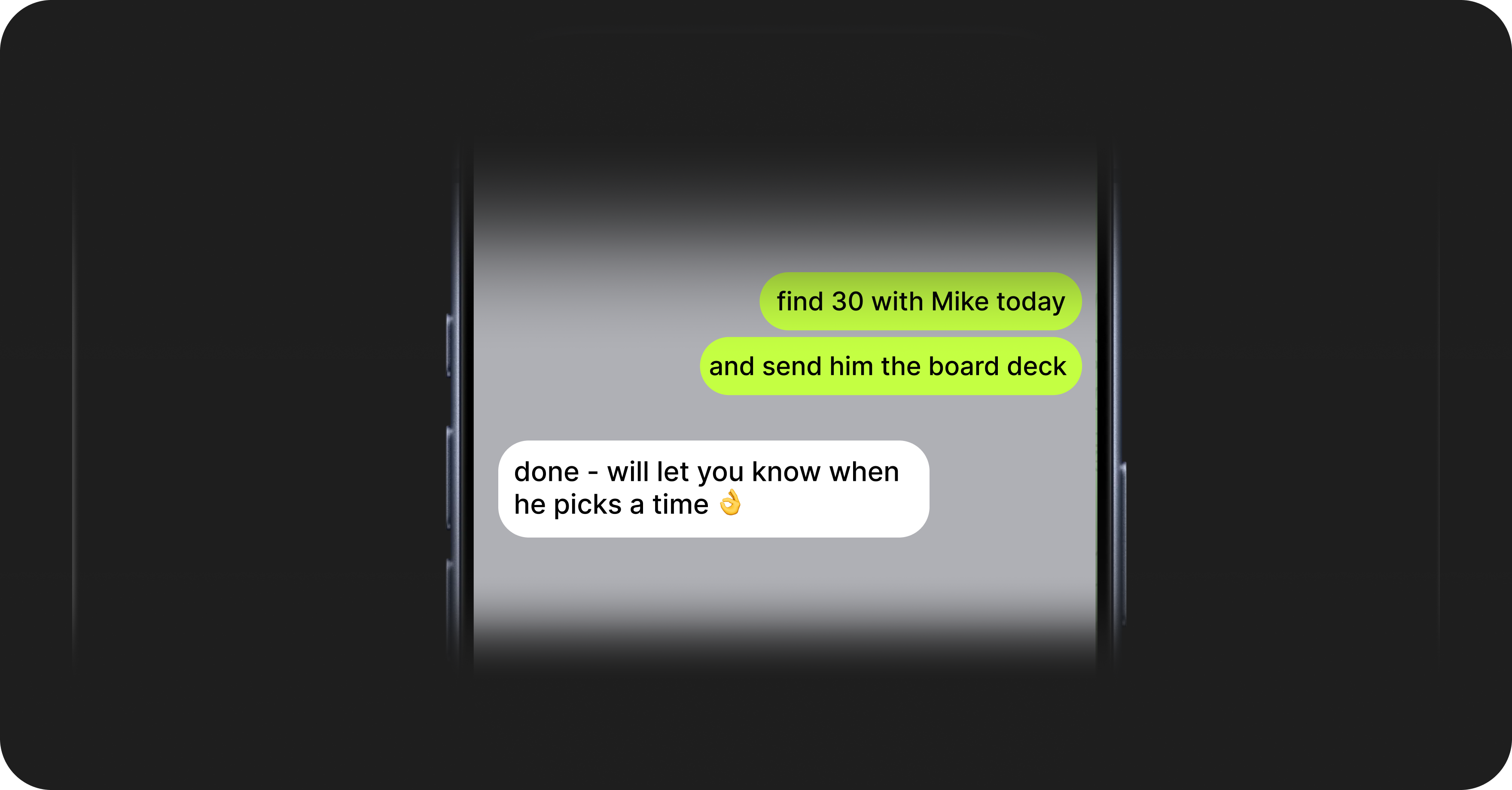
Connect an email account and a phone number, and Lindy starts managing your inbox, scheduling meetings, joining and summarizing calls, and drafting replies in your writing style. You interact with it largely through text, iMessage on iOS or standard SMS on Android, so you can ask it to do something the way you'd message a colleague.
For example: “Hey, order some cookies to the office”
- An agent builder
With the release of Lindy 3.0, the platform added a no-code builder where you describe an agent in plain language and Lindy assembles it. This is where the heavier automations live: AI SDR agents that research leads and run outbound, customer-support triage agents, recruiting screeners, and custom workflows that span several apps.
The distinguishing feature of Lindy is reasoning: it doesn't follow fixed if-this-then-that rules. Lindy's agents interpret context, decide which tools to use, and adjust their approach when a step fails. That flexibility explains both why people like it and why costs are hard to predict.
📈Lindy 3.0 and the agent model
Most of what makes Lindy interesting in 2026 comes from the 3.0 release, which reframed the product around autonomous agents rather than scripted automations.
Agentic reasoning
A Lindy 3.0 agent is built as a directed graph of nodes. Each node is either a trigger (an email arrives, a calendar event is created, a Slack message is posted) or an action (draft a reply, append a row to a sheet, send a message).
Nodes that need intelligence call a language model with structured outputs, and you can choose which model powers each node. Lindy exposes frontier models such as Claude and GPT-class models, so a single agent can mix a cheaper, faster model for routine steps and a stronger one for the steps that need real reasoning.
The graph structure is a conscious tradeoff between. Fully open-ended LLM agents tend to wander and fail unpredictably; rigid workflows can't handle anything they weren't explicitly programmed for. Lindy's structure keeps the agent on rails while still letting each node reason about its specific task.
Autopilot and computer use
The headline 3.0 feature is Autopilot, Lindy's computer-use capability. Each agent can be given its own cloud-based computer that it can see and operate. Instead of being limited to apps that offer an API, the agent can open a browser, read the screen, click buttons, fill forms, and pull data from dashboards the way a person would.
The result: Lindy can use tools with no native connector andt can often still use it through the browser. The tradeoff is that browser automation is slower and more error-prone than a clean API call, and it consumes more usage. Computer use is gated to the higher tiers.
The proactive loop
Used as a personal assistant, Lindy runs a recurring loop rather than waiting for commands:
- Observe. Scan connected services for new activity, such as unanswered emails or calendar conflicts.
- Analyze. A model evaluates what's there and whether anything needs attention.
- Decide. The agent determines whether to act, and on which items.
- Act. It drafts, schedules, or sends, depending on the task and your approval settings.
- Learn. It updates its memory of your preferences based on what you accept, edit, or reject.
A typical day-in-the-life sequence looks like this:
Morning scan
├─ Observe: check inbox for threads with no reply in 48h
├─ Analyze: 3 threads match; sender importance estimated
├─ Decide: draft follow-ups for 2, flag 1 for manual review
├─ Act: prepare drafts in the user's voice; queue for approval
└─ Learn: note which drafts the user sends unchanged
⚙️How does Lindy AI work? The technical architecture
For anyone evaluating Lindy at the infrastructure level rather than the feature level, here's how Lindy AI works under the hood and how the platform is put together. The whole system stacks up like this:
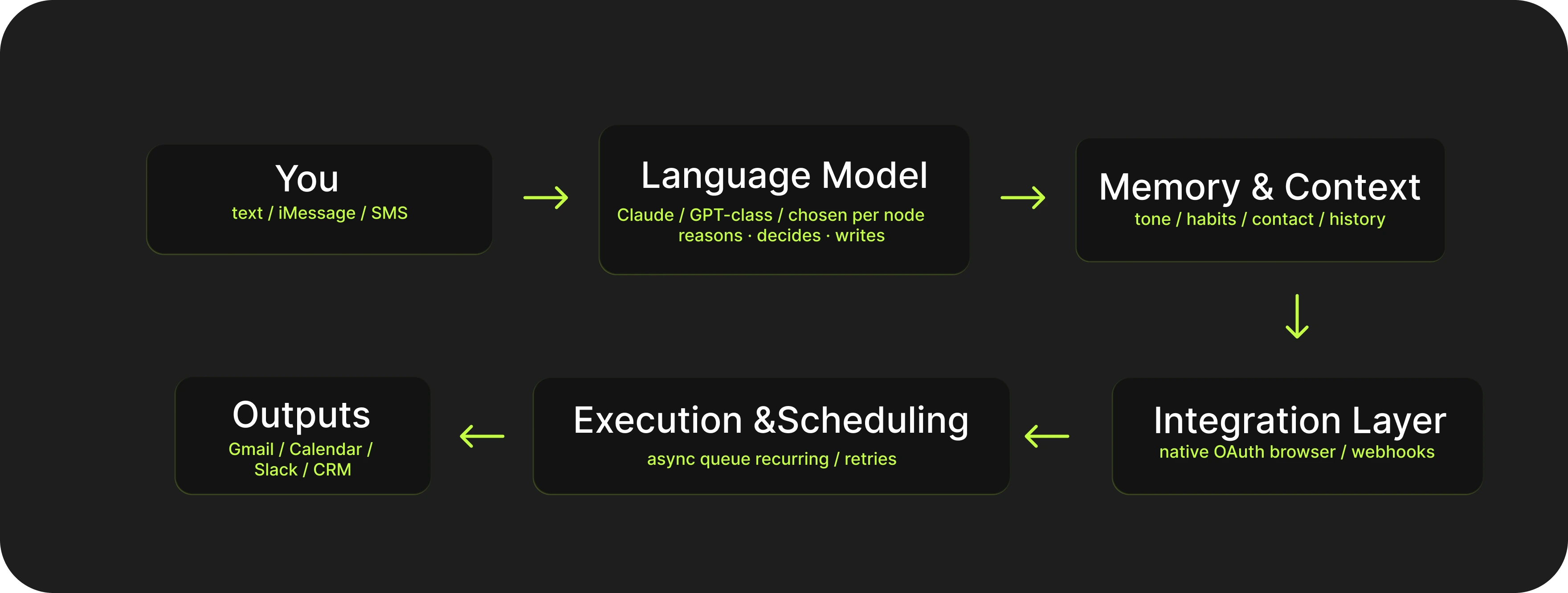
Imagine, you send a message: "reschedule my 3pm and tell them why". It goes up to the language model layer, the part that understands what you meant. That gets checked against memory (how you usually word things, who this person is to you). The integration layer is the set of doors into your actual apps, so the request can reach your real calendar and inbox. Execution is the part that does the task and retries if something fails. At the bottom are your everyday tools where the result lands. In plain terms: each box is a step between "you ask" and "it's done," and the only part you ever touch is the top one, text. Everything below it happens on its own. The practical takeaway for you: setup is light because Lindy owns most of these layers, but for the same reason your data flows through all of them on Lindy's servers, which is the tradeoff to keep in mind.
Language model layer
Lindy orchestrates third-party frontier models (Claude- and GPT-class) hosted in the cloud. The reasoning, the decision about which tool to call, and the natural-language generation all happen on those hosted models. Because model selection is configurable per node, the effective cost and quality of an agent depend partly on which models you assign to which steps.
In plain terms: this is the "brain" of the assistant, the part that reads what you wrote, figures out what you want, and decides what to do. Lindy didn't build its own AI; it rents the same top models you've heard of (the ones behind ChatGPT and Claude) and wires them together. It means that the intelligence is already excellent on day one, you're not training it from scratch.
The "chosen per node" detail matters for one practical reason, cost. A workflow can use a cheaper, faster model for the boring steps and a smarter, pricier one only where real thinking is needed. When you build with Lindy's templates this is handled for you; if you build your own agents, it's a lever you can pull to keep bills down.
The catch: because this brain lives on Lindy's servers, every message you send is read and processed in their cloud, not on your computer.
There is no local LLM for the core agent. If you've seen Ollama mentioned in connection with Lindy, that's a connector-level integration: an agent can call a local Ollama endpoint as one action inside a workflow, but Ollama cannot be the brain that drives the agent.
Integration layer
Lindy connects to external services three ways:
You will see much larger integration numbers in Lindy's marketing and in some reviews, ranging into the thousands. Those figures fold in the agent builder's broader app reach and computer-use access to arbitrary websites. The conservative, accurate way to read it: roughly 100+ first-class native integrations, plus effectively open-ended reach through browser automation. Both numbers are "true," they're just measuring different things.
Memory and context
Lindy maintains persistent context per user: your writing style and tone, how you handle your calendar, which contacts matter, and the outcomes of past actions. This memory is what people mean by sayong Lindy "learns" them. It's updated continuously, and it's why drafts and prioritization tend to improve over the first few weeks rather than being good on day one. The flip side is the learning curve reviewers mention: the system needs consistent feedback early on to calibrate.
Week 1 ░░░░░░░░░░ generic drafts, needs your edits
Week 2 ████░░░░░░ picks up tone and priorities
Week 4 ████████░░ drafts you mostly send as-is
(you correct → it remembers → it improves)
Execution and scheduling
Actions are queued and run asynchronously. Tasks can be scheduled on a recurring basis, and the proactive loop runs on its own cadence. Concurrency, rate limiting, and retry behavior exist but are not published in detail, so treat any specific numbers you see as estimates rather than documented guarantees. Audit logs, which matter for regulated teams, are an Enterprise feature rather than something on the individual plans
trigger ─▶ [ queue ] ─▶ run ─▶ ✅ done
                         └─ fail ─▶ retry ─▶ ✅ / ✕ flag
recurring: ⏰ ── runs on a schedule, no trigger needed
Security and compliance
Lindy describes itself as privacy-first: enterprise-grade encryption, data not sold, and data not used to train models. For individuals that's the extent of the formal controls. The compliance machinery sits on the Enterprise tier, as the split below shows.
If you operate under HIPAA or a security review, Enterprise is the plan you need; the self-serve plans won't satisfy those requirements. And regardless of plan, the architectural fact remains that your email, calendar, and documents are processed in Lindy's cloud, which is the consideration that pushes some privacy-sensitive users toward local-first tools.
🪙 Lindy AI pricing in 2026
Lindy is a paid product with a 7-day free trial on every individual plan and no permanent free tier. Pricing is structured by plan, with each higher tier giving more monthly usage and more connected inboxes. These figures are from Lindy's official pricing page.
🧮 The usage model, and why bills can surprise people
The single most important thing to understand about Lindy's economics is that it is consumption-based. Every action an agent takes draws down your monthly usage. Lighter actions cost little; heavier ones cost a lot.
Roughly:
- Simple actions (send an email, update a calendar event) consume a small amount of usage.
- Moderate workflows (analyze a thread, run a multi-step task) consume noticeably more.
- Heavy operations (research-and-synthesis, multi-step lead workflows, browser automation) consume the most, and can burn through an allowance quickly if run at volume.
This model has a clear benefit: you pay in line with the value you get. A light Plus user can complete a meaningful amount of work within the standard limits.
Th drawback is predictability: costs are hard to estimate in advance because there is no clear pricing preview before a task runs. Workflows that seem inexpensive can end up costing more, especially those involving web research or computer use. Teams running outbound at scale are more likely to hit limits sooner than expected or require a higher-tier plan.
This is a typical feature of usage-based pricing. So if you need fixed monthly costs, flat-rate tools or token-based open-source setups provide more control. If your usage, on contrast, is moderate and you prefer paying only for what you use, Lindy’s model can still be a good fit.
🗣️Lindy AI review: what users actually say
Any honest look at Lindy's reputation has to start here: it splits sharply by platform, and that split tells you more than either set of reviews on its own. Reading only one source gives you a skewed picture — which is what made some earlier write-ups read like hit pieces.
The G2 picture: strong
On G2, Lindy holds around 4.9 stars across roughly 170 verified reviews. Ease of use is the most common theme: non-technical users can get agents running without help. Time savings come up in specific terms: one team reported saving 10 to 20 hours a week, another got 10 agents live in their first week. G2 skews toward business buyers and is partly vendor-curated, but the volume and consistency are hard to dismiss.
The Trustpilot picture: weak
On Trustpilot, it's around 2.4 stars. The complaints are specific and repeat across reviewers: charges after cancellation, unexpected costs when a free trial ends, a cancellation process that wasn't fully self-serve, credits running out faster than expected with little warning, slow support during billing disputes, and occasional reliability issues — an agent going quiet, or fumbling a task it had handled before.
How to read the split
The split maps to who's reviewing: business buyers vs. individual consumers. Business users with a defined use case and some budget flexibility tend to have a good experience. Individual users who hit an unexpected charge and wait days for a response don't. Both are describing real things. The question is which situation is closer to yours.
🧩 Who Lindy is a good fit for?
Lindy fits best when the use case is clear and the budget can absorb usage-based pricing.
- It's a strong fit if you're an individual professional who wants an inbox-and-calendar assistant you can run by text, and you value not managing any infrastructure.
- It's a strong fit for sales teams and SDRs who want AI agents handling lead research and outbound, this is where the reviews are most enthusiastic and the time savings most concrete.
- It's a reasonable fit for ops, support, and recruiting teams who want to delegate repetitive multi-step work and are comfortable training the agent over a few weeks.
But:
- It's a weaker fit if you need predictable flat monthly costs, if you require local or self-hosted data handling for privacy or compliance reasons below the Enterprise tier.
- If your need is a single narrow workflow that a cheaper deterministic tool would run more reliably, or if you want to run agents on your own hardware.
Lindy AI alternatives: the best AI automation tools in 2026
No single tool wins for everyone, and the best AI automation tools for you depend on whether you want a managed cloud service, lower and more predictable cost, local data control, reproducibility, or an agent that learns your patterns.The strongest open-source alternatives to Lindy are OpenClaw and Hermes, both made easy to run through Atomic Bot. Here's the landscape, then a closer look at each
📊Lindy AI vs OpenClaw vs Hermes: quick comparison
OpenClaw vs Lindy AI: a closer look
OpenClaw is a free, open-source AI agent framework with a large contributor community and an extensive skill marketplace. Instead of a managed cloud service, it's software you run, with a local gateway and a big library of community-built skills. As an OpenClaw alternative path for people who want the same open-source power without the manual setup, Atomic Bot (covered below) installs and runs it for you.
OpenClaw's strengths are transparency and control. You see exactly what each skill does, you pay only the metered cost of the LLM you connect, and your data stays on your infrastructure. The tradeoff is that it asks more of you up front, this is a tool for people who want control and are willing to set it up, which is precisely the gap Atomic Bot exists to close.
The core difference: Lindy reasons through each task fresh — it handles fuzzy, one-off requests but behaves differently run to run, and costs scale with thinking. OpenClaw executes predefined skills identically every time: same input, same output, fully auditable.
Hermes vs Lindy AI: a closer look
Hermes is another free, open-source option, built on Nous Research's Hermes models, that sits conceptually between Lindy and OpenClaw. Like Lindy, it learns and adapts; like OpenClaw, it's open and runs under your control.
Its distinguishing feature is self-generated skills. The first time you ask Hermes to do something complex, it reasons through the task from scratch, which is slower. Then it reflects on what worked and writes itself a reusable skill. The next time, it skips the reasoning and runs the saved skill, which is much faster. Over time the agent becomes customized to your specific recurring tasks without you writing any code.
The tradeoffs are the mirror image of OpenClaw's. Hermes has no large day-one skill library, because skills are generated from your own use, and the integration ecosystem is smaller. It rewards people who run the same kinds of tasks repeatedly and want an agent that gets better at exactly those tasks.
The core difference: Lindy learns your preferences inside its cloud; Hermes learns on your hardware and writes its own reusable skills, so the agent gets faster and more personalized over time without any data leaving your machine.
✅Lindy AI, OpenClaw, Hermes agent: Choosing between
Lindy AI. A managed cloud assistant with no setup. Strong when you want proactivity, the text interface, and someone else running the infrastructure, and you can absorb usage-based pricing.
OpenClaw (via Atomic Bot). The open-source choice for reproducible workflows and a large community skill library. Best when you want runs that behave identically every time and full control over your data.
Hermes (via Atomic Bot). The open-source choice for personalization. It learns from your usage and writes its own skills over time, so it gets better at your specific recurring tasks.
Both OpenClaw and Hermes differ most from Lindy at the architectural level: the agents can run on your own hardware, your data doesn't have to touch a vendor's cloud, and you pay only the metered cost of the model you connect.
🏎️ How to run OpenClaw or Hermes without the setup
If you've read this far and decided OpenClaw or Hermes is the right fit, but the install, terminal commands, and configuration are the part holding you back, that's the gap Atomic Bot can fill. It's a free desktop app that sets up and runs both for you, so you get the open-source agent you want without touching a command line.
What Atomic Bot gives you:
- Free and open-source, no subscription. You pay only for LLM usage if you use a cloud model, and nothing if you run a local one.
- Transparent costs. If you connect a cloud model you see the provider's per-token meter; if you run locally, the marginal cost is essentially zero.
- Simple setup. Download the app, create an agent, choose OpenClaw or Hermes, connect your tools. The backend wiring is handled for you.
- Local-first privacy. Runs on your own hardware by default, or your own cloud if you prefer. With a local model, no data leaves your machine.
- Auditable. The code is open-source, so you can inspect, fork, or self-host.
→ Run OpenClaw on Atomic Bot (Windows, macOS, Linux)
→ Run Hermes on Atomic Bot (macOS)
❓FAQ
Is Lindy AI worth it in 2026?
For the right user, yes. Business users and sales teams who set up a clear use case tend to rate it highly (around 4.9 on G2) and report real time savings. The catch is usage‑based pricing that can be hard to predict and billing/support issues from self‑service users (Lindy sits around 2.4 on Trustpilot). It makes sense if you want a managed cloud assistant and can live with variable cost; much less so if you need flat pricing or tight control over where your data lives.
How much does Lindy AI cost?
Plus is 49.99 dollars a month, Pro is 99.99, Max is 199.99, and Enterprise is custom. Higher tiers give you more usage and more connected inboxes; Pro and above add computer control. There’s a 7‑day free trial on individual plans and no ongoing free tier.
Why do people complain about Lindy's pricing?
It's consumption-based, and the product doesn't show what a task will cost before you run it. Anything involving web research or browser automation burns through usage fast, so bills can land higher than expected. The harshest reviews mention charges after cancellation and slow refund responses. Watch your usage from day one, and if you don't plan to stay past the trial, cancel through account settings before it ends.
Does Lindy run on local models or my own hardware?
No, the agent runs on cloud-hosted models, and your data is processed on Lindy's infrastructure. You can point a workflow step at a local Ollama endpoint, but the agent itself isn't local. For a fully local setup, Atomic Bot with Hermes or OpenClaw and a local model is the better fit.
What's the difference between Lindy and open-source agents like OpenClaw or Hermes?
Lindy is a managed cloud service: no setup required, but your data goes through their infrastructure and you pay based on usage. OpenClaw and Hermes are open-source agents you run yourself (Atomic Bot makes that one-click), so data stays on your hardware and you only pay for the model you connect. Lindy is faster to get started with. The open-source route wins on control, privacy, and cost predictability.
Is Lindy secure and compliant?
Lindy uses standard encryption, doesn't sell your data, and says it doesn't train on it. The formal compliance features, SSO, SCIM, HIPAA support, audit logs, signed BAA, are Enterprise-only. If you're under HIPAA or going through a security review, the individual plans won't be enough.
✏️Final word
Lindy is a capable platform. Its 3.0 agent model, computer control, memory, and text-based interface are strong features and it makes to perform well in clearly defined use cases, especially in sales and operations.
The main limitations are pricing and architecture. Costs are hard to predict, and the cloud-only setup does not suit teams that need to keep data local. Most issues come from a mismatch between the tool and the task, or from expectations that do not fit its pricing model.
This issue of unpredictable costs applies to the category as a whole: in 2026, agent tools largely split along one axis: convenience versus control. Cloud platforms like Lindy offer quick setup and a smooth experience but trade off cost visibility and data ownership. Open-source agents like OpenClaw and Hermes require more effort but give you transparent costs, local data, and no vendor lock-in. They just solve different problems.
It means that your pick should always be based on your main constraint: it's either cost, privacy or capabilities.