.svg)



🎯 Quick answer
Grok Bot is a team of always-on AI agents from SpaceXAI, the xAI entity that emerged from the SpaceX merger and has agreed to acquire Cursor, in a deal it expects to close in Q3 2026. It has been in beta since August 11, 2026. The agents sign into your web apps with your real logins, run multi-step work in the background, and keep going after you close your laptop. There is no free tier and no standalone plan. Access rides on a subscription you buy for something else: SuperGrok Heavy at roughly $300 a month, Cursor Ultra at $200, or a Cursor Teams seat — $120 for Premium, while Standard seats get in through a trial or on-demand usage. That one-time trial is the only way to look before paying.
The detail a lot of launch coverage got wrong: your bots do not get a computer each. SpaceXAI states in its FAQ and its documentation that all of your bots share one machine, along with its files, browser sessions and app logins. Its security page is blunter still: "Do not use separate Bots as a security boundary." And deleting a bot may not remove that machine's files or browser sessions.
It runs on macOS, Windows and iOS. No Linux, no Android. The approval model is documented. Retention isn't, an audit view is promised but not shipped, and Cursor's Legacy Privacy Mode blocks Grok Bot outright — standard privacy modes work fine.
If you want the same shape without the price or the waitlist, an open-source agent on a cloud deployment of your own does most of it, from $19 a month.
How does Grok Bot work?
Most write-ups describe Grok Bot as "an AI teammate." That's the marketing frame. Underneath it is a virtual machine on SpaceXAI's servers, and it is persistent — not a session, not a sandbox that resets. A file system, a terminal, and a browser that stay exactly where you left them. You reach it through the desktop or mobile app; the work happens there, not on your laptop.
A day-one reviewer described opening the environment and finding a Finder-like file manager, a terminal and a browser side by side. Files stayed put, installed tools stayed installed, browser logins stayed logged in. Persistence is the feature: the agent's memory lives in a working directory that survives, not only in a context window.
Does each Grok Bot get its own computer?
No. All of your bots share a single cloud computer, and SpaceXAI is explicit about it in all three places it explains the product.
The documentation says so under a heading that leaves no room for interpretation, Bots share one computer:
"All of your Bots use the same persistent cloud computer. They share files, browser sessions, and app logins, which makes handoffs possible without repeating setup."
The product page says the same thing in its own words. Expand the FAQ item "Do Bots share one computer?" on x.ai/bot
"Yes. Every Grok Bot shares one persistent cloud computer... Isolation is per user, not per Grok Bot."
The security page adds the instruction that matters: "Do not use separate Bots as a security boundary." Each bot gets its own screen on that machine, and that is all the separation you get.
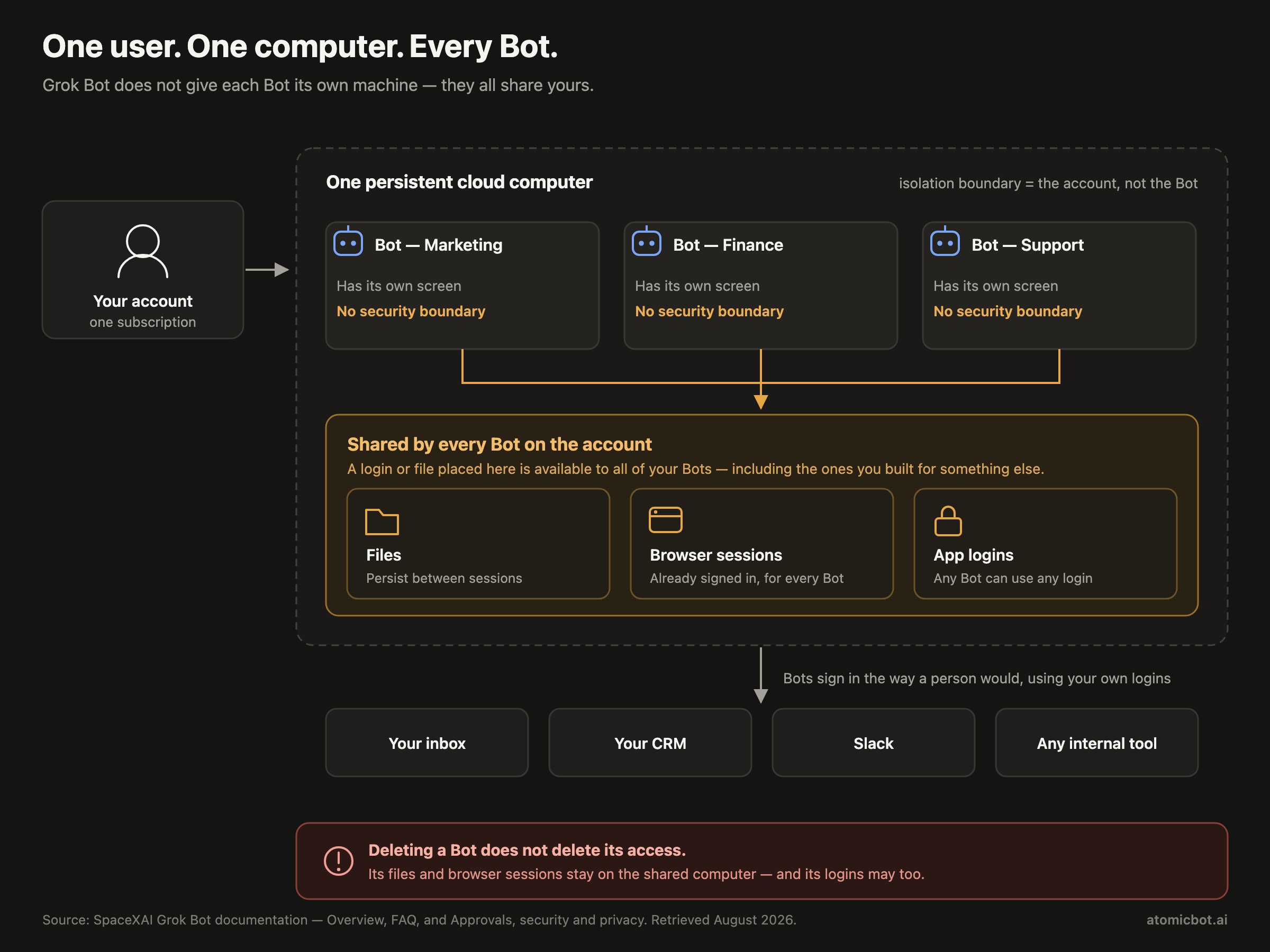
A lot of launch coverage said the opposite. Unite.AI's headline on August 11 was "Always-On AI Teammates With Their Own Cloud Computers" — the claim is in the URL slug as well as the headline. It wasn't alone. If you read that each bot gets a machine of its own, that's where it came from. The practical consequence: the bot you built for marketing research uses the same browser, with the same cookies, as the bot you gave your finance logins to.
One beta user with a month of access says the opposite, twice, in that same thread: "it's a separate VM for each bot" and "each one has their own computer." Hands-on impressions count for something. But SpaceXAI's Overview, its FAQ and its security page all say otherwise, and the security page is the one telling you not to rely on the separation. Where a user's impression and the vendor's own security guidance disagree, follow the guidance.
How Grok Bot gets into your applications is the design decision that matters most, and it cuts both ways. It doesn't use OAuth scopes or vendor APIs. It opens a browser, logs in with your actual credentials, and holds the session — working through interfaces rather than APIs, as TNW put it, and signing in the way a person would.
The upside is surface area. Any web app you can log into, the bot can operate: no integration to wait for, no API tier to buy, no vendor partnership required. SpaceXAI's own examples — overnight lead research, pulling receipts from inboxes, updating CRM records from call transcripts — are vendor-supplied and not independently verified.
The downside: your real logins live on a computer you don't own, and every bot on your roster can reach them. SpaceXAI has published more about this than the launch coverage suggested — though less of it is automatic than it first appears. The documentation asks you to set the boundaries in your own request, listing what to fence off: sending messages, publishing, purchases and transfers, deleting data, changing permissions, production changes, accepting legal terms. Separately, when an action does need approval, you get Allow once, Deny and Always allow, plus Auto Review rules. For passwords, passkeys, two-factor codes, CAPTCHAs and payments, the bot is supposed to hand you the screen rather than take the credential.
Three gaps remain, and they're the ones that matter. Retention isn't specified; the docs defer to Cursor's terms. There is no audit log yet — the teams documentation says only that "an audit view of Bot actions is coming." And privacy mode is a narrower story than it first looks: standard privacy modes work, but Privacy Mode (Legacy) blocks Grok Bot entirely, so a team on it can't use the product at all.
One documented detail deserves more attention than it has had: deleting a bot may not remove the shared computer's files or browser sessions. The bot is gone. Its files and sessions are not — and its logins may not be either.
What is a Teach Task?
Where it's available — the documentation gates it behind a "when Teach a task is available" — you perform a workflow in the bot's browser while it watches. It converts what it saw into a reusable routine you can trigger or schedule.
The day-one reviewer used this to record a search-and-compile task and to build a Slack routine that auto-replied to new messages. Both worked. What didn't work well was teaching it a long business process from scratch. When a ten-step routine broke, there was no clean way to find which step broke it. Short routines held. Long ones got hard to debug.
That maps to what we've seen with OpenClaw skills too. Small, single-purpose, composable beats one monolithic workflow every time, regardless of which agent framework you're on.
Can Grok Bots work together?
You can run several bots at once and they pass work between themselves through a queue-like structure, escalating to you only when a decision is needed. It's cross-session messaging, exposed to the end user instead of buried in a dev tool.
The clearest public example comes from Danny Limanseta, a UX designer with pre-launch access. He pointed a bot at his own art-generation tool and told it to replace every placeholder image in a game he was building. The bot read the project code to work out what each placeholder was for, wrote its own prompts, generated the images, cropped them, converted them to transparent PNGs and put them back into the game: 74 assets in about two hours. That chain — read code, infer intent, operate an external tool, integrate the output — is the part a chatbot can't do.
What model does Grok Bot use?
SpaceXAI hasn't named them, and that's not an oversight on our part: the documentation lists none, and the day-one reviewer found no model-selection UI. Coverage has tied Grok 4.5 to Grok Build, the coding agent, not to Grok Bot.
It isn't one model, either. The teams documentation says each request "routes to a fixed set of models for its surface, with automatic failover," and that billing follows whichever model actually served. Team admins can see which one did, in usage analytics. Nobody gets to choose it, and SpaceXAI says that won't change: "We do not plan to allow admin or user choice for models that are used with Grok Bot."
What's confirmed is the part that affects you: there is no model picker. If you want the agent reasoning on Claude for one task and something cheaper for another, that option doesn't exist here.
Grok Bot pricing
There's no Grok Bot plan and no Grok Bot checkout page. You buy something else and Grok Bot comes with it.
Prices checked on x.ai and cursor.com, August 12, 2026. SuperGrok Heavy is listed at roughly $300/month; SpaceXAI publishes no per-seat rate for it.
That table is the whole menu. No free tier, no standalone purchase, and every way in is a subscription to something else. There is a one-time trial, which is the only way to look before paying. For a solo user with no team to join, the realistic entry point is Cursor Ultra at $200 a month.
The "$120/month" framing travels further than it should. For a five-person team that's $600 a month, $7,200 a year, before anyone has measured whether the bots finished anything.
Two reasons for that price, and only one is about compute. A persistent machine per subscriber is expensive: a computer that idles, holds state and wakes on a schedule whether you use it or not is a fixed monthly cost per seat, and the unit economics stop looking like an API business.
The second reason is distribution. Bundling into Cursor Ultra and SuperGrok Heavy means SpaceXAI never has to sell a new seat — it raises the value of subscriptions people already hold and makes the top tiers stickier. Smart commercially. Just not a pricing decision made with individual users in mind. Worth noting that the Cursor half of this runs through a company SpaceXAI has agreed to buy but hasn't closed on; a separate compute agreement between the two predates the merger.
Grok Bot review: early users and known problems
The Hacker News launch thread is more useful than the press coverage, because a few people in it had been using Grok Bot for weeks before it went public.
The most substantive endorsement came from a user who'd had it for about a month. Keeping bots separated by domain, they said, produced better results than one agent doing everything, and the async work held up — and the comparison they reached for unprompted was Hermes Agent.
The thread's first substantive reply was three words: "so like OpenClaw ???" That instinct is correct, and it framed most of the technical discussion.
The objections clustered around one thing, and it wasn't capability. Commenters kept returning to the same discomfort: agents running non-stop with access to every account, and what happens when one is hijacked by prompt injection. Several raised jurisdiction rather than technology — handing a US company live session access to every internal tool is a harder sell outside the US, and harder still at $120 to $200 per employee per month.
And then there's the comment that names the actual gap:
"This seems like the middle ground between work mode and OpenClaw/Hermes (which I've never tried, too scared to mess something up)."
That's the whole problem in one parenthetical. The open-source agents are free, more private and more customizable, and a lot of people who want them never install them because the setup looks like something you can break. Grok Bot's actual innovation isn't the VM — it's that nothing has to be configured. Configuration is a solvable problem, and it doesn't cost $200 a month to solve.
What Grok Bot gets wrong right now, being fair to a one-day-old beta:
- No retention policy, and no audit log yet. The approval model is documented and reasonable; these aren't. For a product whose core mechanic is holding your logins, that's the gap that matters. SpaceXAI says an audit view is coming — more than nothing, less than having one.
- Work stops just short of done. The designer whose 74-asset run is described above also used it to unsubscribe from marketing newsletters. The verdict, in full: it "did this beautifully, though it did miss a few." The miss is small; noticing it is still your job. The same post reports the bot being slow at first — and then being fixed, by writing it a purpose-built skill.
- Long routines are brittle. Teach a Task is great for short flows and fragile for long ones, with limited visibility into where a run went sideways.
- Ordinary beta bugs. One user on day one: "GitHub login on iOS is just broken. GitHub gives 404 after logging in so I can't even try it."
- The login flow still needs you. A question that came up early in the thread was how a bot gets into login-walled sites like LinkedIn. A beta user answered within minutes: the bot hands you its screen, you log in yourself, then tell it you're done and it carries on. That puts an asterisk on "runs while your laptop is closed" for any site that logs you out.
- No model choice. A fixed set of models with automatic failover, and SpaceXAI says it has no plans to let admins or users pick.
- Enterprise is still rolling out. Not a waitlist exactly — the docs say to contact your Cursor account team — but not self-serve either.
One detail says more than any benchmark: among the first things that day-one reviewer did inside their $200-a-month Grok Bot was install Hermes Agent, a free open-source agent, and run it in the VM. The expensive part of the stack was the computer. The agent was replaceable.
Grok Bot vs Atomic Bot
Every claim above about Grok Bot is checked against SpaceXAI's own documentation rather than its launch materials — which is how we caught the shared-computer point that most coverage got backwards. We also read the launch-day reporting, the published hands-on accounts from people with pre-launch access, and the full Hacker News launch thread. Where SpaceXAI hasn't documented something, retention and audit logging in particular, we say so instead of guessing. Atomic Bot we run in production.
Choose Grok Bot if your company is already on Cursor Ultra ($200/mo) or Cursor Teams Premium ($120/seat/mo), your workflows live in web apps with no usable API, and someone else approves the invoice.
Choose Atomic Bot if you want to start today without a waitlist, you'd rather your credentials sat on a deployment of your own, you want to pick the model per task, or you'd rather start at $19 a month than $120 a seat.
Atomic Bot cloud plans run $19 (Base), $39 (Pro) and $79 (Max) a month, each step adding capacity and inference credits — $5, $10 and $20 toward Anthropic, OpenAI and Google models. Past that you bring your own key and pay the provider directly. The local install costs nothing and is BYOK from the start — if you already pay for Claude or GPT, that may be nothing extra at all.
The honest caveat: Grok Bot's price includes Cursor Ultra or SuperGrok Heavy, which are real products with real value. If you already pay for one, Grok Bot's marginal cost to you is zero. That's the strongest argument in its favor, and nothing in the tables above answers it.
Can you choose the model on Atomic Bot?
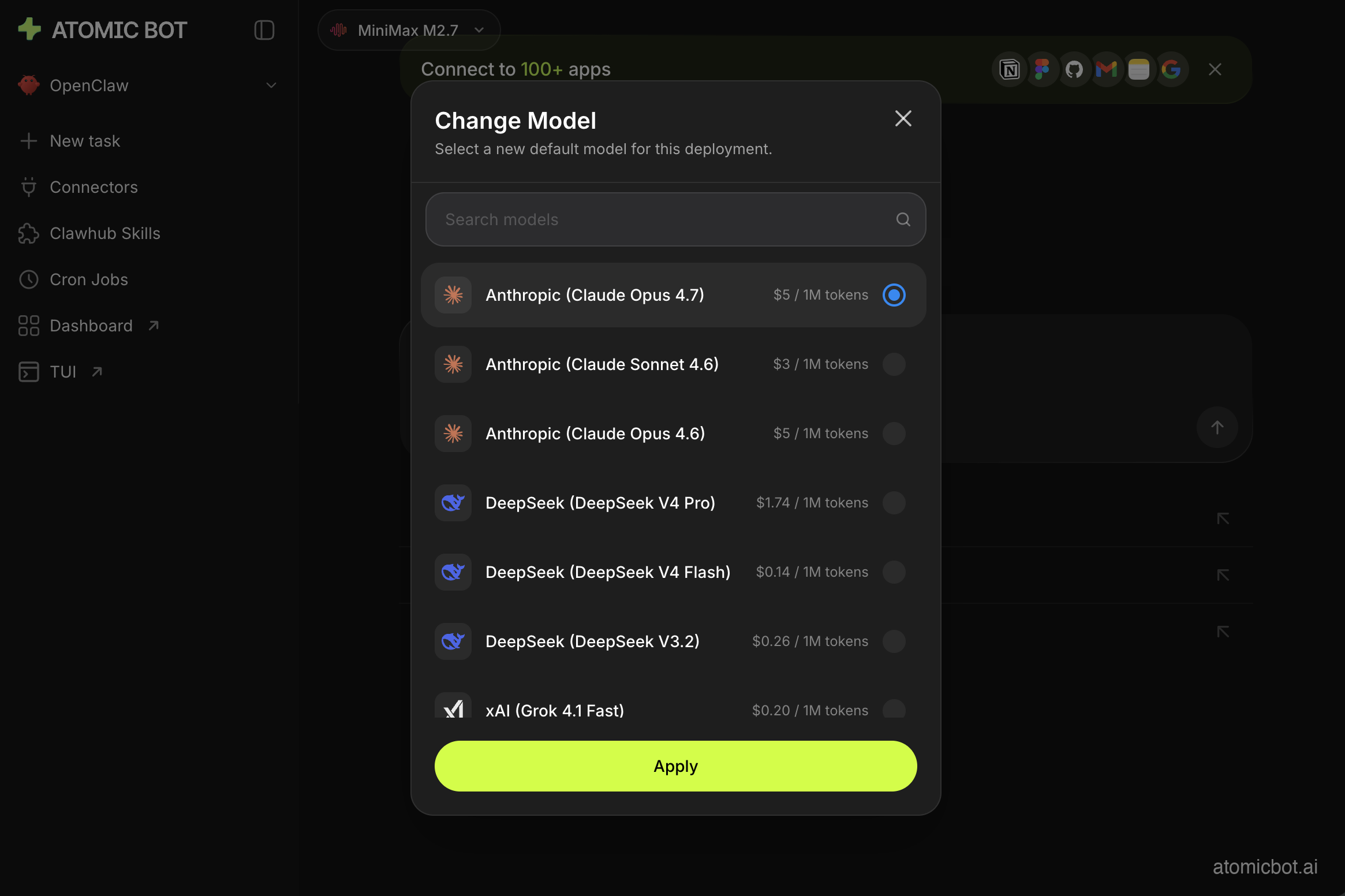
Grok Bot runs a fixed set of models it hasn't named, with no way for you to pick. Atomic Bot runs Claude, GPT, Gemini, Grok, or a local model on your own hardware, BYOK, and adds new ones as they ship. It lets you route different tasks to different models. Cheap model for classification, expensive model for the judgment call. That's not a luxury; it's most of how you keep agent costs sane.
Self-hosted isn't automatically cheaper, and anyone who tells you otherwise hasn't watched a bill arrive. OpenClaw's heartbeat defaults to 30 minutes — if you authenticate to Anthropic by OAuth or the Claude CLI, which many readers of this section will — and runs in the agent's main session, which means it carries the full conversation history. OpenClaw's own documentation puts that at roughly 100K tokens per run. That's 48 wake-ups a day, each re-reading everything, most of them reporting that nothing happened.
Do the arithmetic at published rates. 48 cycles × 100K tokens is 4.8M input tokens a day. On Claude Opus 5 at $5 per million, that's about $24 a day, roughly $720 a month, spent almost entirely on the agent confirming there was nothing to do. More than SuperGrok Heavy, for an agent that did no work. On the one-hour default, halve all of it: 24 cycles, about $12 a day, roughly $360 a month — still more than SuperGrok Heavy, and still for nothing.
The fix is model routing. Cheap model for the recurring "did anything happen?" check, mid-tier for routine work, frontier model only where judgment is actually required. Current Anthropic rates, per million tokens:
The frontier model is 5× the cheap one on input, not the 50× the folklore suggests, so routing pays off because most calls are low-value, not because the good model is unaffordable. (Sonnet 5 is also running an introductory $2/$10 through August 31, 2026, which makes the middle tier unusually cheap at the time of writing.)
Model choice alone doesn't close that gap, though: the same heartbeat on Haiku still runs about $4.80 a day. The setting that actually does the work is isolatedSession, which gives each heartbeat a fresh session instead of the whole history: OpenClaw's docs put the drop at roughly 100K tokens down to 2–5K per run. Combine the two and 48 daily cycles cost around 17 cents, not $24. Add activeHours so it isn't polling at 4am when nobody can answer, and a personal setup runs in single-digit dollars a month.
Three config flags separate a self-hosted agent that undercuts Grok Bot by two orders of magnitude from one that outspends every tier above.
Drawbacks. On the local install, that tuning is yours to get right. Those three flags stand between single-digit dollars a month and a bill larger than any Grok Bot tier, and nobody tells you about them on the way in. Grok Bot won't let you make that mistake, because it won't let you make the choice — one model, fixed price, nothing to misconfigure. If nobody on your team wants to own a token budget, that's worth real money, and no amount of open source fixes it for you. On our cloud plans those defaults ship already set.
Where do your logins live?
Both products need your logins to be useful; the difference is custody. Grok Bot holds them on a shared machine you don't control, under a documented approval model but an undocumented retention policy, and deleting a bot leaves its files and sessions in place. Atomic Bot Cloud puts them on your own encrypted deployment rather than a machine shared across bots; running locally keeps sessions on your own machine instead.
Read the approvals page before you connect anything. Check what the shared computer already holds before you give a bot a finance login. And don't treat separate bots as separate permissions — SpaceXAI tells you not to.
For a personal inbox either is a reasonable risk. For customer data, regulated records or payment systems, the undocumented option isn't a real option yet.
App integrations and skills
Session-based login lets Grok Bot operate any web app that renders in a browser, including internal tools that will never ship an API. That's the one place its architecture beats ours outright. Atomic Bot covers the same ground through browser control plus 100+ integrations and 700+ skills — good on the long tail, not the same thing as "anything with a login page." If your work lives inside a niche SaaS product nobody has integrated, Grok Bot is the more direct answer.
Teach Task is a nice recording feature, and it's also the ceiling. Atomic Bot runs OpenClaw, Hermes Agent or Codex — open source, fully editable, with an installable skill ecosystem behind them. When the default behavior is wrong you change it instead of filing feedback.
Which one should you use?
Solo founder or freelancer. Atomic Bot Cloud at $19 a month, or the free local install if you'd rather keep everything on your own hardware. You're automating your own inbox, calendar and files. Grok Bot's cheapest solo door is $200, and nobody is approving that invoice but you.
Already on Cursor Ultra. Try Grok Bot. It's included, the session-login reach is useful, and the marginal cost to you is zero. Just don't give it your production credentials this month.
Enterprise with compliance requirements. Neither. Grok Bot has no published retention policy, and its audit view is announced but not shipped. Atomic Bot Cloud is a managed platform, which means it doesn't give you an air-gapped boundary either. If you need one, self-host and own the machine.
You want both. Reasonable, and people are already doing it. The reviewer running Hermes Agent inside a Grok Bot VM figured that out on day one.
Grok Bot FAQ
Is Grok Bot free? No. It comes with SuperGrok Heavy (~$300/month), Cursor Ultra ($200/month) or a Cursor Teams seat, and there's a one-time trial. What there isn't is a free tier or a standalone purchase.
Does each Grok Bot get its own computer? No. Every bot belonging to one person shares that person's cloud computer, along with its files, browser sessions and app logins. On a team, each member gets a machine of their own. SpaceXAI's security page tells you not to treat separate bots as a security boundary. Much of the launch coverage reported the opposite.
How is Grok Bot different from regular Grok? Grok is the model. Grok Bot is the agent that runs on it. Regular Grok answers questions; Grok Bot gets a persistent cloud computer, signs into your applications, runs scheduled routines, and keeps working while you're offline. Chat versus action.
Can Grok Bot access my email and bank accounts? Technically yes, since it logs in the way you would. Should it? Not during an early beta with no published retention policy or audit log. Current guidance from reviewers is to keep it away from production systems, financial accounts, and regulated data.
Is there a Grok Bot app for Linux or Android? No to both. The setup guide says plainly that Grok Bot is not currently available as a Linux desktop app, and there's no CLI or web client either — the desktop app and iOS are the only ways in. The Linux install script at x.ai belongs to Grok Build, the coding agent, not to Grok Bot.
What's the best Grok Bot alternative? For most individuals and small teams, an open-source agent on a deployment of your own: Atomic Bot running OpenClaw, Hermes Agent or Codex, from $19/month in the cloud or free locally, with your choice of model.
What are the alternatives to Grok Bot?
An open-source agent on hardware you choose: OpenClaw, Hermes Agent or Codex, on a cloud deployment of your own from $19 a month, or on your own machine for nothing but model spend. Same persistent computer, same browser control, same scheduled work, no waitlist, and you pick the model. If your employer already covers Cursor Ultra or SuperGrok Heavy, none of this is urgent — just keep production credentials away from the beta this quarter.
The question isn't which agent is smarter. Both will read your email, click your buttons, and stop a little short of finished. The question is who holds the logins while that happens.
Grok Bot's answer is SpaceXAI, on one machine shared by every bot you own, under a retention policy nobody has published, for $120 to $300 a month, or a Cursor Teams seat if someone else is buying. Atomic Bot's answer is a deployment of your own, from $19, with three config flags you're responsible for getting right. One of those is a pricing decision. The other one isn't, and it's the one you'll still be living with next year.
Get started
Go to atomicbot.ai. Sign in, choose your agent — OpenClaw or Hermes — and you're running in about five minutes.